The Calum Johnson Show · Youtube · 93:04

The Simplest Way To Use Codex In Your Business, Content and Life

A 93-minute beginner primer on building AI agents that actually work, from a self-taught dev who argues simplicity beats complexity every time.

Posted
June 1st 2026
yesterday
Duration
93:04
Format
Interview
educational
Channel
TC
The Calum Johnson Show
§ 01 · The Hook

The bait, then the rug-pull.

A self-taught engineer who reads AI research papers for fun and works inside a platform used by hundreds of AI applications sits down to explain the one thing most beginner guides get backwards: simplicity is not a limitation, it is the only approach that actually works.

§ · Voices

Who's talking.

00:00hostCalum Johnson
00:00guestRas Mic
§ · Topics

Where the time goes.

00:00 – 01:46

01 · Hook

Cold open clip plus subscribe ask, then host frames the problem: most people using AI agents are not getting more productive.
01:47 – 08:31

02 · Why simple agents beat complicated ones

Complexity is a content strategy, not a productivity strategy. Boring workflows finish. The extravagant ones get clicks.

08:32 – 15:01

03 · Why your first agent failed

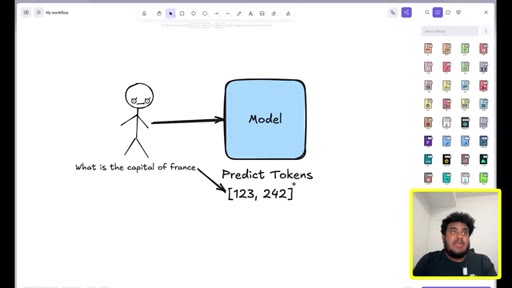
Models predict tokens, not intent. They have no agency, no relationship context, no common sense. Understanding this is the prerequisite to building anything useful.
15:02 – 21:43

04 · Good vs bad prompts

The agency spectrum analogy: a model responds the same way a low-agency employee does to a vague ask. Step-by-step instructions produce step-by-step results.
21:44 – 24:19

05 · Why Codex beats Claude Code right now

Rate limit generosity and compute subsidy math. Not loyalty; whoever gives the most compute for the price wins today.
24:20 – 34:43

06 · Real use cases

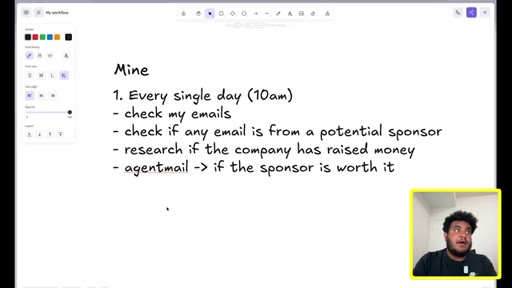
Sponsor email filter, bookkeeper replacement, receipt aggregator, weekly analytics reports. Anywhere data is scattered, an agent can aggregate it.
34:44 – 45:08

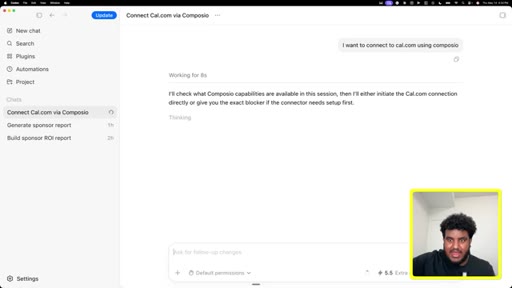
07 · Live Codex demo: connecting tools

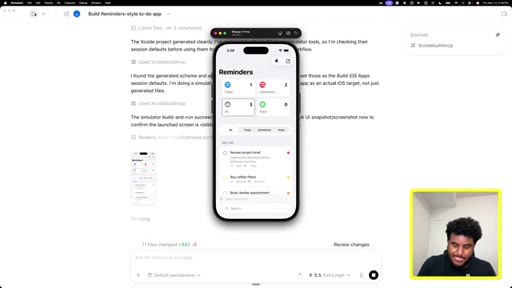
Full walkthrough of Composio as tool router, connecting YouTube, Dubb analytics, cal.com, Linear. Shows how to fix expired auth links by screenshotting the error and prompting the agent.

45:09 – 60:51

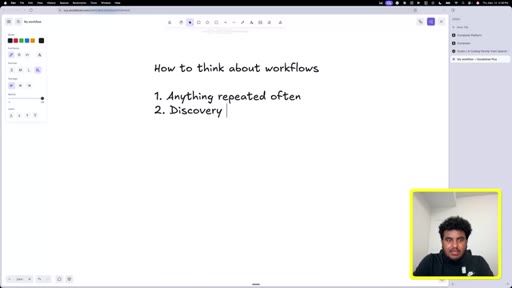
08 · How to identify what to automate

Two categories: anything repeated often, and discovery mode. Connect all tools and ask the agent what it notices. Both start by documenting your weekly tasks.

60:52 – 65:34

09 · Why the lazy prompt works

The sponsor report is built incrementally. By the time the final prompt is sent, the agent already has YouTube stats and Dubb analytics in context.

65:35 – 80:27

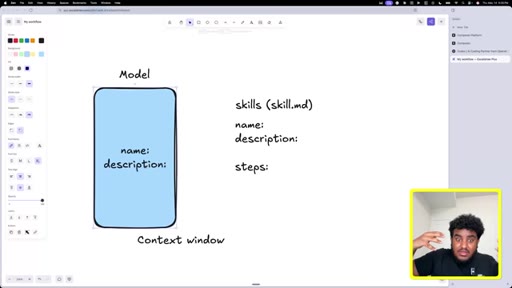
10 · What is a skill?

Skill files store name plus description in active context; steps are only loaded when called. Analogy: knowing chapter titles vs reading every page. Reduces memory bloat and improves performance.
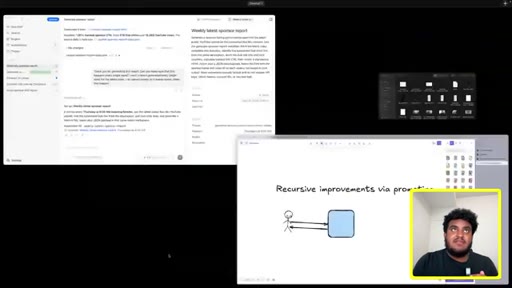
80:28 – 93:04

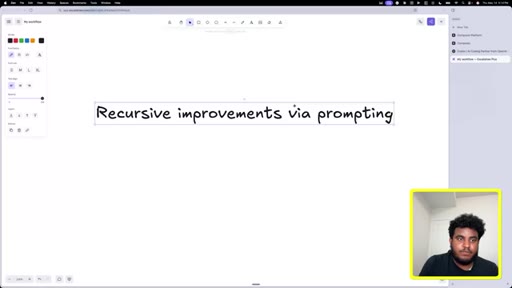
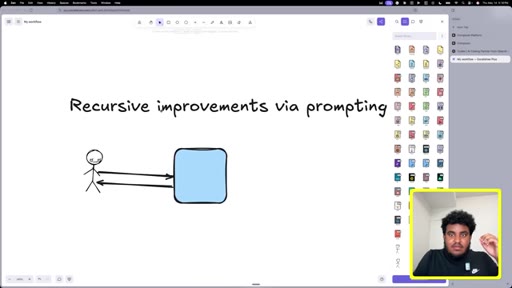
11 · Recursive improvement and closing

How to fix bad outputs via recursive prompting. Personal story of going from failed startup exit to credibility by sticking with it. Final message: consume and do, not just consume.

§ · Quotables

Lines you could clip.

03:20
"There is what looks cool and there is what works. And what works oftentimes is boring."
Standalone contrarian take, no setup needed → TikTok hook
29:00
"The quality of input has to be good because when the quality of input is good, the quality of output will be good."
Tight and repeatable principle → newsletter pull-quote
73:00
"Information is no longer a blocker."
Inspirational close, works standalone → IG reel cold open
90:00
"The best skills are the ones you generate after a successful run."
Actionable rule, punchy → TikTok hook
§ · Resources Mentioned

Things they pointed at.

36:40toolComposio ↗
45:00toolDubb ↗
83:20toolWhisperFlow
43:20toolAgentMail
27:30productGamma ↗
70:00toolLinear ↗
40:00toolcal.com ↗
§ 04 · The Script

Word for word.

HOOK opening / re-engagementCTA the pitch analogy
00:00HOOKWhen people say they had bad workflows or bad outputs, it's because we're relying on the model to be like us. It's not.
00:06HOOKWe need to be very, very, very, very, very explicit. We're not going to allow the model to be creative. And with these agents, there's what looks cool and there's what works.
00:16I used to have a bookkeeper. I don't have a bookkeeper anymore because I literally dumped all my statements.
00:22And then I asked them, look at the transactions and look at what sounds like a restaurant or a food spot, and then remove that. Let's say that someone's watching this and they want to build their first AI agent that's actually productive.
00:35What in your mind is the step one? Awesome.
00:38CTAYou know what? I'm just gonna open Codex, and we're going to go through it together.
00:43CTAOkay. So a lot of you will be watching and seeing this show for the first time, and so I wanted to ask for a quick favor, and that's to subscribe to the channel. And if you do, the promise that I'll make is we're gonna take everything that we do here to the next level.
00:58CTAThat means scale the guest, scale the storytelling, the production, every little detail
01:05CTAof what makes this show great so that we bring you an even better experience. You hit that subscribe button, we make this show better for you.
01:14CTADo we have a deal? Let's get back to the show. Here's where I wanted to begin.
01:21CTABecause you and I, we had a conversation before this, and I think for most people that I speak to that I've tried using AI agents, it's not actually making them more productive.
01:33CTALike, it's not saving them time. It's not helping them make money or increase their output. And so if someone is listening with that feeling
01:43and with that experience of using AI agents, what is gonna be the value to them of listening to this conversation to the end?
01:52Yeah. I think there's a lot of, like, um, bad information out there on how to use these tools.
01:58Um, a lot of times, people are scaling for what looks cool, but really what you want is to scale for productivity. And just like in anything in life, simplicity always wins. And with these agents, when you use them with a simplistic mindset, when you have an end goal in mind, and we're gonna, you know, discuss that and architect that together, you start to realize, oh, this is actually a productive tool.
02:18Right? A lot of people are attaching 15 different workflows from other people, not learning how to build their own. So if there's one thing I want people to get from this podcast is they get an agent, and they know how to build a workflow that works for them.
02:30It might not work for me and you, but it's gonna work for them. And at the end of the day, that's what matters. My workflow is mine, and yours is yours.
02:37You know what? What you just mentioned, and I know that you and I spoke about this,
02:42it's actually, like, a contrarian take because most videos creators
02:48content that we see is people that are using, like, 50 different agents that the architecture and the system is incredibly complicated and complex. Why is it that you have this different perspective?
03:02Like, why is it that simplicity actually wins here? Yeah. So my mom always told me to be nice, so I'm gonna be nice to people who have contrarian takes.
03:11It's either one or two things. Um, complexity looks cool. Right?
03:14Like, when you have, like, 15 different sub agents, I'm sure, like and I'll do it too from time to time. I'll feel like Iron Man, like Tony Stark. Right?
03:21But when it comes to actually being productive, there's what looks cool and there's what works. Right? And what works oftentimes is boring.
03:29I'm sure you would say in business with all the people you've interviewed in yourself, sometimes it's the boring stuff that gets to the finish line. It's literally no different with using these tools. It's a matter of a lot of people, especially on YouTube, and I'm a YouTuber.
03:42Right? Like, I do content. The extravagant stuff gets clicks, and it's cool, and it's and it's fun, and it, you know, sort of paints this picture of a future that we can maybe have thousands of agents doing, like, you know, thousands of things, and you're just home sipping a pina colada.
03:55Uh, but the truth of the matter is when you want to use these agents, there's a couple things that are misunderstood. A, they're very powerful. B, they're very smart.
04:06C, this sounds contradictory, they're also very dumb, and, d, your influence matters a lot more than you think.
04:12Right? When you take all this into consideration, 15 sub agents don't make sense because you're not doing 15 things at the same time. Right?
04:21So I hope, like, in this pod, we sort of have, like, a mindset shift. People give it a week or two to test this out, and they come back to this video and be like, you know what? The guy with the messed up here was right.
04:31I love it. You know what? Because you you talk about the the mindset shift,
04:35and I think it's important. Can you just make it clear for people? If they're able to go through that mindset shift and some of the things that you and I speak about over the next eighty or ninety minutes, they're able to implement,
04:49what is gonna be the tangible impact in their lives? Like, what is it that they're gonna feel once this is implemented?
04:57Yeah. So, like, the first thing is you're actually going to see productivity with these tools, right, depending on, like, your personal work and stuff like that. Like, if you're a super busy person with a business and you have fifteen, twenty adamant things, then you're gonna love this.
05:10If you're someone who's just getting started out, you might see some value in some of the things. But the one thing I I look at and I think of is, like, investing in in in knowledge of these tools and how they work and sort of understanding high level how models and agents and stuff work feels like an investment for the future.
05:26Right? So, like, we can imagine next year from now based on the last year's growth, the models are gonna get better, the tools are gonna get better, agents are gonna be all over the place. It it it seems like anyone who's made an investment now in learning these things will be well equipped for the future.
05:40Right? So it's not just a now thing in my opinion. It's also sort of prepping for the future.
05:45Because I remember last year messing with these tools. A lot of them were garbage. Right?
05:50Like, they were so bad. But, you know, we kept like, people like me kept tinkering because you saw, like, okay. At some point, this thing's gonna get good, and now it's really good.
05:58So imagine where will we be six months, a year from now. So we're gonna experience, um, how to craft specific workflows and skills and all these thing things, and I'll explain all of that.
06:09But we're also sort of future proofing our mind so that when the latest and greatest tool comes, there's parallels we can draw from the previous tools that we've used. Yeah. You know, I think I think it's so good, and and you make that point about super proofing
06:22your mind and, like, being ready for the future. And so one thing, because you mentioned this when we spoke earlier, you said, I happen to be in a position
06:31that gives me unique insight on all of the stuff that's happening with AI and the software changes that we're experiencing. When you say that, I happen to be in a position that gives me a unique insight.
06:44Can you describe what that means? Or can you explain what that means? Yeah.
06:48So there's there's two things. First and foremost, you're not gonna get a biased take from me because none of these companies pay me. And the job I'm in, uh, I work for a back end as a service company that a lot of AI applications integrate to.
07:01Um, I see a lot of the progress made. I I, like, I see a lot of the updates made. I'm also very much a person who doesn't go outside.
07:07I go outside on Sundays for church. Other than that, like, my free time is spent reading the latest papers, seeing the latest updates, trying the latest tools. Right?
07:15So with, uh, when you take mere obsession plus my day job plus my content plus me, uh, not being bought by any of these companies, again, you know, pray for me. Hope hopefully, it happens.
07:27Yeah. I I I I have a unique perspective that's not biased, and, you know, I'll call garbage what's garbage, and I'll call great what's great. Yeah.
07:34You know what, Mike? Because you make you make the point that you're deeply inside this world. Like, you spend all of your time doing this.
07:42I think also the thing that I respect from you and why we I invited you on the show, like, I wanted you to do an episode with us, is you don't gatekeep information. You know, like, you you share information
07:53to people that are just starting out or even if they're more into this sort of thing. Can you just share with people why are you so open
08:05about sharing the information that you do? Because you're you're directly benefiting from using all of these tools, like, in your life. You don't necessarily have to share it.
08:13So so why are you so open in that? I remember getting into the space, Like, I felt really dumb. Like, I felt like, oh, man.
08:21All these people are so smart. They're so intellectual. Like like, they use all these big words.
08:26Like, they they construct these sentences that I have no understand no understanding in terms of what it means. And I remember, like, especially, like, early, like, 2021, 2022, I would watch videos by really, really smart people. We're talking about, like, developers, researchers, all that stuff, and I would force myself
08:42to listen to them. And this is pre chat, GPT. Then I would Google what they said trying to understand what it is they meant.
08:48So I went through a very painful process of learning, and I realized, oh, a lot of this stuff isn't really that hard. It just sounds hard.
08:57Um, and I I shared the story with you. Part of how I started the YouTube channel was I I was looking for a developer job, and, like, it just felt like no one was hiring or my resume wasn't good enough.
09:06So I I was like, okay. Maybe if I record a video of me explaining really deep technical concepts, um, that the recruiter watches and they see and they understand, then maybe they'll be like, okay.
09:16This guy's smart, they'll push me, like, to the forefront. That never happened. But what happened was that YouTube channel started to pick up.
09:22Um, and then I saw that, oh, people actually wanna learn about this stuff. Right? Like, a lot of people find technology
09:28fun, but it just feels like it it's above them, they don't understand, and they don't wanna make the investment in understanding. And, yeah, I just kinda made it like a thing where I was like, you know, I'm
09:39gonna explain it to one of the homies. Right? Like, I record my videos as if, uh, my bro or one of the homies from church was watching,
09:46And I guess that's helped a lot of people, so I'm very thankful for that. Yeah. Yeah.
09:50That's that's awesome. And I I I love the intention. Like, you can feel it in your work.
09:55You know what, Mike? I just wanna I wanna get straight into it. And
10:00in particular, because we started it off in this conversation, and this has been to be transparent, this has been my experience.
10:07Because a few weeks ago, we record an episode with our mutual friend, Riley Brown, and he talks about OpenClaw and how he's using it in his business and how how he has all these agents. And so I get super excited.
10:19I don't actually start with using OpenClaw. I start with Claude Cowork, and I spend a few hours setting up this workflow that's gonna help me do content or in my business with Claude Cowork.
10:32I set it up. It gives me an output. So I get to that point where it's given me an output.
10:38The output is mediocre at best. From that point, basically, from four weeks ago, I haven't used it again.
10:45And I think that that's like a common experience. And so for people like me,
10:53what is the thing that we're like misunderstanding or doing wrong when it comes to building these AI agents where we're not actually getting a useful output at the end of this long process? Okay.
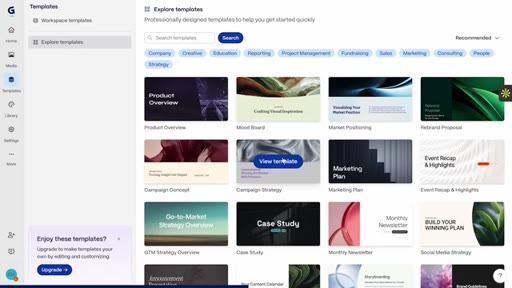
11:04Real quick. If you're watching this video, I'm sure at some point you've had to create a presentation in your life. And if you're a non designer like myself,
11:13then that probably was not a good experience. The funny story is I actually started my career in consulting and I would only work in building presentations
11:22for clients, and it'd be this horrible manual experience. It would be so frustrating trying to get everything to look just right on the slides. But now with tools like Gamma,
11:34you simply type in a text prompt and it will design a beautiful presentation in exactly the way that you want it.
11:42And so as an example, recently I wanted to create a short form content strategy presentation to share with my team.
11:50And so I simply went into Gamma. I selected one of their templates, and I described how I wanted this presentation to look.
11:57And so what I asked Gamma to do was to build me a short form content presentation using some of the strategies from the top podcasts in the world. And you can see here what it came up with, and I actually think it's pretty impressive.
12:11You can see we have the platform strategy, even created this checklist for choosing viral clips, and you can see it looks great. And so if you wanna create good professional looking presentations
12:23without all of the manual design work that typically comes with it, then go to the link in the description and check out Gamma. That's Gamma using the link in the description to get started with them today.
12:36Thank you to Gamma for sponsoring this episode. Let's get back to the show. Yeah.
12:40I mean, I could share my screen and, like, diagram this out. Let's do it. It really comes from, um,
12:46like, when you understand how models work, um, it will all make sense. Right?
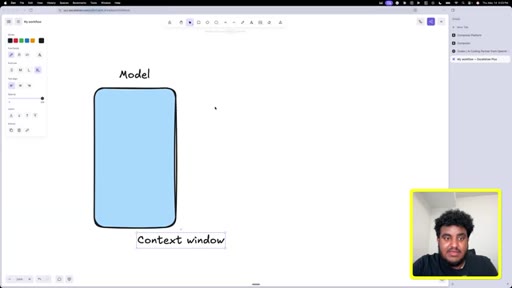
12:51So you can think of this giant blue box right here as a model. You can it could be Opus, uh, 4.7, which is Anthropix
13:00latest model, or it can be GPT 5.5, which is OpenAI's, uh, latest model.
13:05Both are really, really capable and smart models. The issue with a lot of people and how they use it is a lot of people
13:14think the model is similar to them in a sense where, you know, the model kinda sounds like us, acts like us. You might hear these stories where, like, oh, they did some testing and the model they got the model to blackmail one of the users and all that stuff. It it feels very human like,
13:30but it's not. And understanding this is important because when you understand where it lacks and where it's great at, it becomes a great copilot. Right?
13:38I think agents are a great copilot. You're still the pilot. You're still in charge, uh, but they're a great toolkit.
13:44Now one of the interesting things about how models work is they actually, um, don't think the way you and I think. Models,
13:53uh, predict tokens. Now a lot of people are gonna hear this and be like, oh, this nerd is about to speak some jibber jabber and it's gonna confuse me. I I I promise all this will make sense.
14:02Tokens are basically numbers, like weird looking
14:07and these numbers are plotted on a graph. If anybody remembers in grade ten, eleven, or nine, whatever, like, year it was, like, at math class, we'd have to draw these graphs, and then we have to plot them, and it was annoying. And I was like, why is this ever useful?
14:21It so happens that the researchers who build these models needed that stuff. So glad to hear that at least some of those things were useful. So what the model does, it it understands
14:31and predicts tokens. What does that mean? Let's say,
14:35Callum, I prompt what is the capital of France. Right?
14:40This is my prompt. What is the capital of France? You and I know that the capital of France is Paris.
14:46It's been taught to us. We have it stored in our brain, like, in in some part of the memory layer of our brain, and we know this instantly. The way model works a model works is it's going to when I type in this text, it's going to convert this text to a bunch of numbers like this.
15:03Again, how it converts? It doesn't even matter. I don't even know.
15:06But it's gonna convert these number these texts to the numbers. It's gonna plot the number on the graph. Mathematically, and this is impressive,
15:14the closest answer, which is Paris, happens to be a number very close on the graph.
15:20So that's what the model does. It doesn't think it doesn't, like, ponder the way you and I do. It literally maps words on a graph and finds the nearest one.
15:31I'm going someplace with this. It's going to map it, and then it's gonna be like, oh, the answer is Paris. There's even another test right now, um, especially with the Anthropic model.
15:40You can ask it. Um, I want to wash my car. There's a car wash 50 miles away.
15:47It's faster for me to walk than drive. What should I do? The model will tell you to walk.
15:53I'm going to car wash to wash my car, but the model will tell you to walk. So the the reason why I say this is the model does not think the way you and I think. So when you understand this, you have to understand
16:05the prompts that you give it, the text that you enter, the messages, the workflow, whatever it is that you construct has to be good. It it like, the quality of input has to be good because when the quality of input is good, the quality of output will be good. But if we talk to the model the way you and I talk to each other where there might be sarcasm,
16:27there might be context of understanding based on a relationship, You know, I can say something to you, and based on the context of our our relationship, it can mean totally something different than if I say it to somebody else. In the same way, the model is not human at all.
16:41It sounds human. It acts human. It's been trained on so much data where you think it's conscious, but it's not.
16:47So when you understand this, you understand you have a really smart, but at the same time dumb machine. So when people say they had bad workflows or bad outputs,
16:56it's because we're relying on the model to be like us. It's not. At its current state, it magnifies the abilities, the wisdom, and the knowledge that you have.
17:05So if you're someone who says, I I don't need to read books anymore, ta da. You gotta keep reading more and kinda gotta keep growing more knowledge.
17:12But this is how models work. So when you understand this, it's going to help, like, especially when we start to craft a workflow. It's going to help us craft a workflow because we're gonna understand we need to be very, very, very, very, very explicit.
17:25We're not going to allow the model to be creative. We're going to give it our creative sauce, and we're going to want it to replicate that. Just so just one thing, Mike, before you before you go on, because I think this is so good and important.
17:36When you say, um, it really comes down to, like, the the prompts and, like, the inputs. Right? It's like good inputs versus bad inputs.
17:45Mhmm. Can you crystallize for people exactly like, what is the distinction between what makes a good input
17:51or how someone can know if they're giving the AI a good input versus a bad out input? Yeah. I I could explain that.
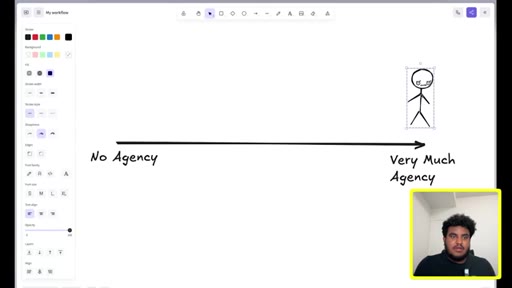
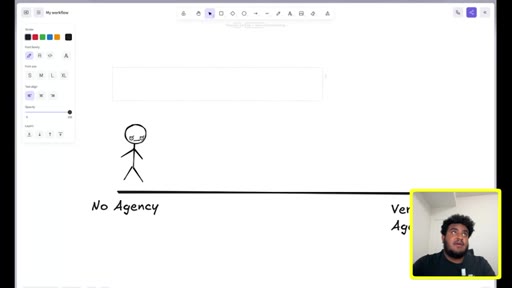
17:58So let's say we have this line, uh, where on this spectrum, this is a person.
18:04They have no agency. Right? And on this end of the spectrum,
18:08they have very much agency. I know that just broke English.
18:12I apologize. Um, but, basically, let's say this individual like, we're looking to hire somebody.
18:18And as a business, we obviously want someone who has, like, you know, a lot of agency. And to have agency means you're given a problem. You might not have all the context,
18:28uh, but you go out of your way to get the context. Um, you have this feedback loop where you keep on iterating on this feedback loop, and at some point, you're going to achieve success. Right?
18:38Like, for example, if I hired an assistant, uh, one thing that I may do, and I'm gonna show us how to do, is generate a a report
18:47for sponsored videos. Now I'll give context on this.
18:51I run a YouTube channel, and one thing I use AI for is after a video's gone live, especially if it's a sponsored video, I'm going to send out a report of how the video performed. Right?
19:02Like, sponsor wants to see if they got a good investment on their money. Now if I told this to a very high agency person,
19:09they're probably gonna research, okay. What does reports in the YouTube space look like? Right?
19:14What things do I need to report? Is it just views, or is it link clicks? Do I calculate a specific thing?
19:20Right? Someone who has high agency will go through the motions, will probably continue to iterate on a specific thing and generate a report that might be decently good. Someone with low no agency will probably be like, yeah.
19:32Like, here's the video. Here's the link clicks. Done.
19:36Right? So, um, we we we see this as humans. Right?
19:39Like, you you wanna work with, like, the very high agency people and the, you know, the ones who, like, make the right decisions, ask the right questions. Models are somewhere here.
19:51Right? And the reason why I say this is it is going to like, it it will produce the amount of effort you give it in the question you ask. Right?
20:01So if I say generate a report for a sponsored video, it's going to generate it as if someone with no agency did. But
20:09if I, let's say, change the prompt to generate a report for
20:15a video. Right? And then I add let me just make this a long line.
20:20I add, um, let me add a new line.
20:23First, get YouTube views, then get
20:29link clicks, then calculate CTR,
20:35then generate HTML page for me to view
20:40the stats. So this
20:44explanation and this get generate a report for a video, to me and you, especially if maybe we've worked together, you know, we're both creators,
20:54generate a report for a video might make sense to us. But to someone who has no agency, you're gonna have to give them step by step direction. The model is pretty much the same way.
21:05You're going to have to be very like, you have to think of this as a very junior, no agency person, but that is very capable and has all the knowledge in the world consumed in their brain.
21:17So this has to, uh, the the the the way you prompt has to shift, you can't give it one liners. You can't, uh, say just do this for me. It doesn't know you or understand you.
21:29Right? You're going to have to give it step by step by step instruction at least one time.
21:34And then I'm gonna show us later down in the in in in in the video how we can take this, convert this to what's called a skill. This is stored
21:43in the agent, and the agent can call this again and again when it needs to. But the very first time, like hiring a new employee, we're going to need to train them. And this is the big difference on, like, good inputs versus bad inputs.
21:57Yeah. You know what? You you just made the point, and I think it's actually the perfect way to look at it, and it's what made it click for me.
22:04100%. 100 per like, that's literally the perfect analogy. Yeah.
22:09Okay. Where do we go to next? So there's
22:12I would say there's a spectrum, um, when it comes to these agents, and the spectrum,
22:19um, really is diff the difficulty. Right?
22:23How difficult is it to set up? We'll actually just have one line here.
22:26How difficult is it to set up? If, like, this is super difficult
22:30and then this is, uh, easy, uh, the following agents fall as follows.
22:38OpenAI and, um,
22:40OpenAI Codex and, uh, Anthropic, their tool, I would say, is somewhere,
22:47like, not in the like, not on the easy spectrum, but somewhere, like, right here. Meaning, um, there is, like, a back and forth. Um, there is, like, a cost of time,
22:57um, that you're going to put. But I believe, like, especially after we go through an example, um, you're going to feel like this is super easy.
23:05These OpenClaws, Hermes, these, like, new agents, I would say, especially for someone nontechnical,
23:11are on the difficult side, uh, when it comes to I'll just say OpenClaw and Hermes, are on the difficult side when it comes to setting up. But, like, using them directly, um, the setup is a bit difficult.
23:23Now there's pros to that. The pros to that is I can have a really highly customizable agent, like, to the core, like, personality,
23:31how it works. Like, everything is fully customizable, and I own, like, the code. With open ananthropic,
23:37you're sort of tied to an ecosystem. You're tied to specific model. Um, so these are the pros and cons.
23:43For first timers or people who are not technical or people who are giving this, like, a try and you're pretty early on, I before we chatted, I was like, oh, coworker seems to be the one, but I've changed my mind.
23:57I think Codex OpenAI's OpenAI's Codex
24:03is the best place to start. A, if you have an itch to build an application, a web or a mobile application, it's a great place to do so. But b, they've started to really focus on
24:13this concept of being like a super app where you can use it for knowledge work. Uh, you can use it for workflows and tasks. You can connect it to external
24:21tools. And that way, you get the both of the best of both worlds where I can maybe develop apps one day if I want to, or I can also automate my life and my business and my personal if I want to. Right?
24:31So, um, for today's video and probably for the near future, um, I would say Codex is the best bang for your buck. So so so, Mike, before we get into it, because this is interesting, you and I spoke, I wanna say, three days ago, two days ago.
24:45I wanna understand and and and when you and I spoke initially, you said that, um, your belief was that for beginners looking to start out, the easiest tool and the simplest way to get started if you wanna use AI agents is Claude Cowork.
25:02And so I wanna understand, what is it that has happened in these last three days that your thinking has shifted? Because I know Codex,
25:11the developments that they've made to are actually pretty new. Like, it's getting better all the time. What has happened that your position has shifted?
25:19So the biggest one the biggest one is the subsidy of credits. What that means is, like, when you subscribe to the o to the Codex $100 a month plan or $200 a month plan or $20 a month plan, and same thing for Anthropic, you're not actually getting $200 of value.
25:39You're getting, like, 3 to $5,000 worth of compute. For example, the Claude, uh, $200 subscription,
25:46you are technically getting $5,000 worth of compute. Meaning, they are viscerally burning money.
25:52Um, you are getting, like, the best value on the $200 month subscription. Recently, the last couple of days and especially, like, the last two days, um, Anthropic has been, like, cutting down on this.
26:04Right? And OpenAI, on the other hand, has been increasing rate limits.
26:08Right? So when I look at this from a cost perspective, if both of them are equally just as good, what I want is I want to use the platform that's going to give me the most compute.
26:18Meaning, I can keep going back and forth with it, and I don't get rate limited. I don't have to wait till next week to use it again. And OpenAI's
26:25rate limit, Codex's rate limit, is extremely, extremely generous. Right?
26:29So because I have no loyalty to any of these applications because none of them pay me, I'm going to pick the best one for my pockets. And that's when I was testing both of them yesterday. Codex's rate limits were just great.
26:40And to your point, they pushed a lot of updates recently. So it like, based on all that, it felt like the best choice to recommend. So so simply
26:50put, Codex at this point in time that you and I are speaking will allow someone to build more,
26:58to to go back and forth with it more, to build more things for the same or similar price than what Anthropic did with Claude Cowork or Claude Code. Yes. Exactly.
27:08You're going to get more value for the for the subscription you subscribe to with, uh, OpenAI. Before we get deeper into it and how you would go about building your first, like, AI agent using codex that's actually productive
27:22and useful, whether that's making money or saving you time. Can you just share some examples with people of what codex is actually capable of?
27:32Like, use cases that you've seen either for yourself or with peers, friends, creators, uh, people online
27:41of, like, what they've been able to build with Codex. For mine, there's a couple of things. First and foremost,
27:48the, uh, biggest, like, time sync for me, um, was going back and forth, uh, was not even going back and forth.
27:55It was researching sponsors. Right?
27:57There are a lot of people that will email me, especially in the space I'm in, uh, because, like, everyone's building an AI now. There's, like, thousands of emails I get per day. Like, my email, unfortunately, is has been vicinerated.
28:08So I have this one specific workflow where every single day, right, around, I would say, 10AM,
28:16uh, I have a workflow that does the following. Check my emails. Right?
28:22Check if any email so first, it's gonna check my emails, then it's gonna check if any email, um, is from a potential
28:30sponsor. Now the agent's able to catch this because usually they'll put it in the subject line or be in one of the emails. Like, it's pretty easy to catch the sponsor.
28:39I'm about to share some secret sauce. I probably shouldn't have, but I'm I'm gonna share some secret sauce. Then what my agent's going to do is it's going to research if the company's raised the money.
28:48I'm gonna show why. If the company has raised money.
28:54First and foremost, um, in this AI space, dev tool space, software space,
29:01especially for my niche, um, which is, like, technical and nontechnical people, more so technical people,
29:08um, that's a valuable audience. Right? And a lot of the companies that wanna sponsor a channel like mine raise
29:15are raising a lot of money now. And if, obviously, you raise the money, there's two things. First and foremost, you're a legit company.
29:21Right? So we've verified legitimacy here.
29:24Well, most likely, there's I'm sure there's scams that raise money, but the likelihood of it being a legit company is high, number one. And number two, they have money to spend, so the price is gonna be high. Uh,
29:35so I get my agent to do this, and then my agent has its own email. Right? I use a tool called agent mail, and I'll explain, like, different tools to integrate, uh, later in the video.
29:46My agent has its own email, and then it's going to email me, and this is a private email I have that no one has access to but my agent.
29:54It's going to email me if the sponsor is worth it. So what this does is this is basically checking
30:02if the email I got from a sponsor, is it worth it, or is it not? Like, is it worth looking into it?
30:08Is it worth responding? And I would say nine times out of 10, this works.
30:14Right? The first few times I had to really massage it. Right?
30:18There were a couple rules I added. For example, most likely, a sponsor that hits me up with an @gmail.com
30:25could be, like, a scam because there are scams out there. Like, there's a friend of mine who's a YouTuber who connected to a landing page that was like, oh, connect to your YouTube to so he can see your analytics, and, like, he got hacked.
30:37Right? So I have to be careful with these things. So something like this saves me a ton of time.
30:42Another one, and this is the one we're going to build, is the sponsor report. And the reason why I like these is because this is the type of workflow that everyone watching this can set up today.
30:54There is some sort there's data in your life that is scattered between multiple sources that can be aggregated together to be used a piece of information that is valuable to you. Right? Reports aren't just boring old documents.
31:07It's an aggregation of information that should be useful to you. And the report that I generate is you get YouTube views,
31:14right, for a specific video, views for a video. You're going to get link clicks for the sponsor.
31:24You're going to calculate all the nerdy marketing CTRs.
31:30I don't even know half what half that stuffs mean, uh, and other metrics. Generate a HTML page. Right?
31:39This, again, was something that I dreaded that I had to do. And it also got to a point, you know, praise the Lord, I started to grow and a lot of sponsors started to hit me up.
31:51And I thought, you know, I'm an agent. I don't get tired. Let me accept 15 of these.
31:56And now I'm overwhelmed. I have 15 different things to generate. This saved me a ton of time, made me super productive.
32:03And this is the best example I wanna go with because, again, I don't want people to watch this. If you're watching this, I don't want you to watch this and build the same thing that I built. What I want you to see is I I purposely picked an built an example, uh, picked an example that's going to show you how to think about it, and then I want you to dream.
32:21I want you to like, whatever it is in your life, you could build a workflow and to build that. Yeah. You know, it's such a good breakdown, and and a few things that just listening to you,
32:31use cases that came to mind. I'm even just thinking and and you confirm or deny. This has just came to my mind.
32:36Even if people are looking to kinda track their, uh, like, personal expenses in, like, a more systematic, uh, way.
32:45If you're looking to get into content creation, you post on Instagram and you wanna get, like, weekly, monthly, I don't know, quarterly updates on, like, your analytics, what's working versus what's not working.
32:57To your point, there's so many places in our life where we're getting data or information that we're not tracking.
33:05It could even be, like, meeting notes from, uh, like, your weekly meetings at work. You want it condensed into a brief. No.
33:13Even food that you're eating, like, you like, you said it perfectly. Like, you know how there are these expense tracker apps that you gotta take the picture and stuff? You can use the agent.
33:21You can literally take a bunch of pictures of your receipts throughout the day, dump it into the agent, and tell it, oh, put it in a spreadsheet, and you could download that spreadsheet. Like, anywhere you can ingest information, it can be turned into something valuable.
33:35And that's what I want people to think of when they think of workflows. Think of all this information that exists around you, uh, around your business and personal life. Ask yourself, are you efficient with the information?
33:47The answer is no. And if the answer is no, how can I feed this to an agent and produce something actionable
33:54that is actually beneficial? Whether it's condensed information or it's actual work done. Like, that's like if people can think about that, then, you know, this is a w episode.
34:04You know what? Mike, here's here's where I wanna go, which is
34:09let's say that someone's watching this. They have a few hours, you know, coming up this weekend or like a free evening,
34:17and they want to build their first AI agent that's actually productive. Like, either takes work off their plate or helps them do more in less time. What in your mind is the step one?
34:31Like, where should they begin if they're gonna use Codex? Yeah. So there's two things, and, like, I I want people to make an honest assessment of themselves.
34:40Step one, if you are
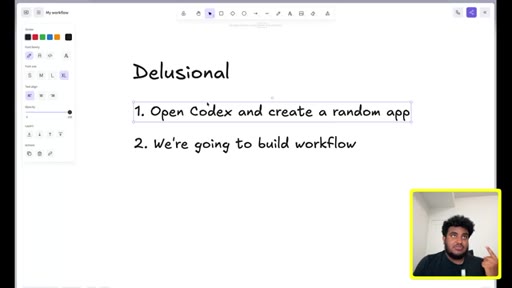
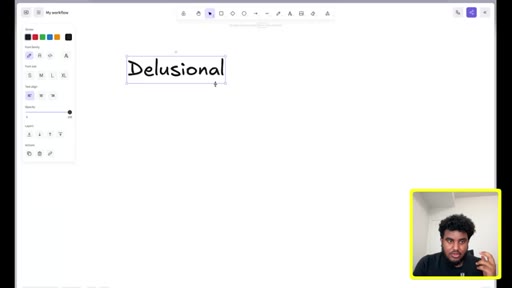
34:44like, point number point one point I wanna make, if you are delusional, column shirt shirt says, meaning, you you you just have this drive where you're going to figure like, you don't need to be motivated to do things.
34:58You're going to drop to step number two, which is we're gonna build a workflow. We're going to build a workflow. But if you're someone who needs a little bit of motivation, you need to watch a David Goggins video before you get into it.
35:12I'm actually going to tell you to open Codex and create a random app. Here's why I say this, and I know this has nothing to do with workflows.
35:23The reason why I say this is I found, uh, Calum, especially with people who are nontechnical, when they just create something random. It doesn't have to be polished.
35:32It doesn't have to be finished. It doesn't have to be live. But when they create something random and and they see it and, like, it's functional,
35:38the dopamine hit you get is the equivalent to whatever class a substance is popular now. Like, there is just this excitement and drive and, like like, I remember I I got one of my church friends to do this, and he hasn't stopped since.
35:53Right? So if you are someone who is like, man, I've tried these tools. I'm just I'm tired.
36:01You're gonna open Cortex. I'm gonna show people how to do that. Um, but for anyone else, um, who's just ready to go, there's a couple there's one specific tool we're gonna need.
36:11Now a lot of people don't share this tool, so I'm gonna share this tool. And this tool is called Composeo. You're gonna go to composeo.dev,
36:19and you're going to make an account. What Composeo does is Composeo becomes
36:25and this is gonna be a new term for people. It's gonna it's called a tool router.
36:30And, basically, what this becomes is this becomes like the layer that allows our AI agent to connect to anything. So let's say I'm using
36:40OpenAI. Right? We'll call it OAI,
36:42and I want OpenAI to connect to my analytics platform, um, called Dubb. Right?
36:48I use an analytics platform called Dubb. What Composio does is I give OpenAI instructions that Composio gives me.
36:55OpenAI connects to Composeo. Composeo then connects to Dubb,
37:01and then Composeo feeds that information back to OpenAI. So now I can give OpenAI access to all the random tools that exist if they're in the compose your directory
37:10while not giving up my password. Right? It's like the ultimate middleman
37:15in a way. Basically, it is the ultimate middleman. It's like the guy with the trench code.
37:19What do you need? And they have everything. They have a generous free tier.
37:22This is one of the tools we're going to need. This is going to be basically our main connector. So I would say,
37:29Callum, this is step number one. When you say connector, Mike, can you just make it clear for people?
37:35What is it what does that mean? So the agent
37:40can do things, but it needs access to your information. For example, let's say I want to give the agent access to my email.
37:49It needs to connect to Gmail so that it can read my emails. That's what I mean by connectors.
37:54Literally, all you do on Google is go OpenAI Codex download. The URL you're going for is openai.com/codex. I've already installed it.
38:03You can install it, and then this is what the app looks like. That being said, plug ins is basically how you connect external services,
38:12external tools to, um, Codex.
38:15Now I can see here they have one that allows me to control my Chrome browser. They have one where I can create and edit spreadsheets. I can create an edit presentation.
38:26So, again, even looking at this, I can start of already think of things like, oh, I could do my taxes, whatever. I could connect to my Notion. Right?
38:33This is pretty cool. Now let's say I wanted to connect my Notion, how I would do it? I would click the plus button,
38:38and then blah blah blah blah blah. I'm just going to tell it to reference memories in chat, meaning I want it to remember the stuff it's done. And I literally click install,
38:47and it's going to basically connect my Notion. So this is what connectors are.
38:52Yeah. So so just to make this, um, clear for people,
38:56when they start using codex, OpenAI already has plugins
39:02like connectors with a bunch of companies. Like, typically, the biggest companies, your Gmail,
39:08Notion, like things that you would use. Where Composio comes in is Composio
39:15so that is OpenAI connecting directly with this third, like this other third party company. Composio is like this middleman that you can
39:25it will have the integrations with your, yes, your Notion
39:31and maybe, I don't even know, like an Instagram or Gmail.
39:34Someone using NetSuite. Right? Like, something random.
39:37Yeah. Right? Like,
39:39they're not going to build a NetSuite integration because it's probably not popular. Maybe it is. I'm wrong.
39:43Co Compozio, their whole business model is there's thousands of tools that these companies don't care about. We're going to make it easy to connect.
39:52So if something isn't in the official plug in directory, guess what I'm going to use?
39:57I'm going to use Composeo. Yeah. So you you get access to more plug ins.
40:02Base. How how do you actually integrate how is Composeo integrated?
40:08Yeah. I'm gonna go to composeo.dev. Right?
40:12This is their website. Oh, very fancy fancy. I'm gonna create an account.
40:17And, um, when you are onboarding, they're going to give you two options. They're gonna say, is this for you?
40:23Meaning, do you wanna connect apps to your AI client, or are you building a platform? Right?
40:28Platforms for the developers looking to build on top of Composeo. What you and me want is the for you. So I'm gonna click on for you, and you're going to see it tells me, welcome back, Michael.
40:39Um, explore what's possible. You can see here it says the most used app is YouTube. I connected YouTube,
40:45um, to my coding agent, and I'm gonna show an example of how you connect apps. There's a plethora of cool things here. You can actually click on connect apps, and you can, like, look at I mean, I'm scrolling, and I'm scrolling really hard.
40:58Like, there is a lot. Right? Like, I'm still scrolling.
41:01I'm still I I I think I I even just saw Polymarket.
41:06Right? Like, if someone wants to connect their agent to Polymarket, you can.
41:10Right? But how do I make this connection? The way you do it is you click on install.
41:16Right? And it gives you actually a couple options. Do you wanna use this with OpenClaw?
41:20Do you wanna use this with Claude Cowork or Claude Code? Or do you wanna use this with Codex? And all you have to do is I'm gonna click install.
41:30Any of these work, but I'm just gonna show you what is going to work the smoothest for you. You're gonna click on MCP, and you're gonna click on API key.
41:39And then you're going to I'm going to reveal this, uh, but then I'm going to change this. If any of you pesky hackers is watching to see if you got an API key of mine, you did not. You take the same screenshot.
41:48So I take this, reveal this right here, and then I'm gonna drag this.
41:53And I'm gonna say, I want you to connect to Composeo
42:00so I can so, actually, so you can connect to external tools. I'm literally this is what you do.
42:09You hit enter, and it sets up itself. And the reason why this is possible is because the agent
42:16writes code that's going to connect to Composeo. And Composeo is built in a way where it gives you access to all these tools.
42:24Right? And to show you how this works,
42:28I'm going to go back to Composio, and let's say I wanted to connect, um, what's a good thing to connect to?
42:37Let's say I wanted to connect to cal.com. I use cal.com every now and then. I'm gonna say, I want to connect
42:45to cal.com using Composio. I'm gonna hit enter,
42:52and we're gonna see what happens. What's basically gonna happen is the agent's gonna realize, oh, I have Composeo connection. Composeo has access to cal.com,
43:01and it's basically going to give me a link to connect to cal.com, and then Composeo is going to give Codex
43:09access to it. Yeah. Let me know if that verbiage makes sense.
43:12No. It it does make sense. One one thing I wanted to point out, and it's something that I'm noticing as you're going through this, the because this is my first time actually seeing,
43:20uh, Codex and even, like, its interface. It's very
43:25similar and and you let me know, Mike. It's very similar in how it works to just using ChatGPT.
43:32I know I know most people have obviously used ChatGPT, at least in America. The functionality feels pretty simple
43:40and intuitive for someone that's used ChatGPT. Yeah.
43:44And I think what they're going to do is they're probably gonna merge the app. Like, I think Codex is the experiment on, like, developers and, like, getting them to, like, getting them to see if they like the model.
43:53And then because the Chargebee interface is pretty familiar with most people, they're probably just gonna merge the two. Right? So that's what I, again, my honest guess, I think it is.
44:03And, yeah, like, into your point, like, it shouldn't terrify you. Right? It looks the same.
44:07It feels the same. It's just a lot more powerful. Now going back to this, it says composeofoundcal.com
44:13toolkit. There's no active connection yet. It says I'm going to start an off flow.
44:17So this is basically it trying to connect to the MCP server. I'm going to allow this to happen. The cool thing is, um, these agents won't go rogue without your permission.
44:26It asked me, can I make the connection? I said yes. Now check this, Callum.
44:30It says open this Composeo link to connectcal.com. I'm going to click this link. And now what Composeo is basically doing is it's it's basically making me log in to the app.
44:43Composeo handles the credential management. My agent's going to have access to cal.com. So I'm gonna click on allow.
44:51It says successfully connected. Let's go back to Codex,
44:55and then this is the cal.com account is, uh, active. I'm doing one read only probe through Composer, so we know the co the connector works beyond just off. Now someone might say, how the heck am I supposed to understand
45:08some of these words? What you do is you copy this, you open a new chat. What does this mean?
45:13Literally, like, it and and this is how I started my career. It's like just asking, like, the instead of, like, being threatened by the difficult words, asking what they mean.
45:23And you'll be surprised, they actually are very simple. Yeah.
45:27I think it's such a great point, you know, especially what you mentioned earlier about, um, like, future proofing yourself. So many people that I speak to have this, like, uh, fear and anxiety of being, like, replaced
45:40in the in their job and in their occupation by AI. And it's like, yes, these learning how to build with these agents can be incredibly useful right now.
45:50But also moving forward in the future, that kind of, like, hustler,
45:56self starter, self taught mentality of, like, I come across something that I don't understand.
46:03I take that thing, I give it back to AI and ask it to explain it, and I learn is actually, to me, it feels like what's gonna be a key skill,
46:12uh, for people, like, moving forward in this kind of new era of AI that we're going into. 100%. Because, like, you you have to think about it.
46:21Right? Like, just a couple years ago, you were sort of limited by the, uh, you know,
46:27amount of knowledge and information you have either within yourself or in in close proximity of the people you have. Now for, like, $20 a month, I have PhD level intelligence in front of me. Right?
46:38And it would be such a bummer to not take advantage of this. And even in, like, my development journey, there's a lot of technologies that I would be I would have been afraid to try.
46:47But now I'm so delusional with it. Like, I'll try new things. I'll build random things.
46:52Like, my mindset is there's nothing I can't build if I have the right information. Now I have the right information. Is it going to take time?
47:00Of course. It might be painful? Of course.
47:02I'm sure everybody watching this knows greatness takes time. Anything worth value takes time, but now I have the information. Information is no longer a blocker.
47:09Right? So that's how I would love people to take these tools. Right?
47:13Like, to like, the the this tool can help me progress and push forward. Yeah. I I I love what you said.
47:18Uh, greatness takes time. You know what? You mentioned it earlier, like, for that delusional
47:24person. For the person that's, like, high agency, self starter, just wants to make things happen, wants to build. You said that the the step one for them would actually be to build a workflow.
47:37And so I wanna talk to that person for a second. When you're thinking about workflows, I know you have, like, the sponsor agent. How can someone even decide
47:48what workflows would actually be good to have their AI agent
47:54take over? Like, talk me through your process of how you even identify the workflow
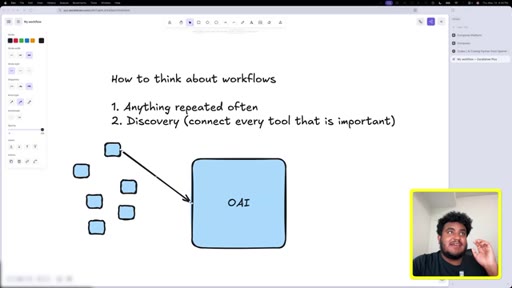
48:00that makes sense to use codex with. Back back to the diagram. So how to create how to think about workflows?
48:08This is how I think about them. Right? A, number one, anything repeated
48:14often. So if there's any task in your life that's often repeated. Right?
48:19Um, like, it's checking emails for a specific thing, whether it's, like, you know, synthesizing specific information, Anything repeated often
48:29can be and should be a workflow. Um, number two, um, and this is I would call this discovery.
48:40You know, data is a gold mine. And believe it or not, most people, because they use 15 different tools, have a lot of data about themselves. Right?
48:49Um, most of us are probably not performing at the level we want to. Right?
48:54And there's all these different things that we have to do. So the second type of workflow is what I call discovery, and that is, you know, connect, you know, every tool
49:03that is important to me. Right? Email being one of them.
49:07Notion might be another one. Um, you know, Figma, linear, whatever those tools are. And, basically, having a discussion
49:14with the agent on the stuff that you do. Right?
49:17And when I say discussion, it can be what are some actionable things that you see that I should do from all the information.
49:24Right? Like, read my emails, read my this, read my that. What are some actionable things that I can do?
49:29Um, generate a report on how much things I've done. Like, the the way I want people to think of workflow is I have all this I have this agent. Right?
49:39I have OpenAI Codex right here. I have all these pieces of information.
49:44Right? I have this right here, this right here. Uh, I have this tool right here.
49:49I have this tool right here. I have this tool right here. All these different tools that I'm using,
49:53the way I want people to think is to use this agent as a synthesizer for all the external tools they use, combine that information,
50:02and see what productive thing can be done. So a lot of it, unless you have repeated work, is discovery.
50:09But in discovery, I've noticed a lot of useful things. For example,
50:15um, I didn't know that like, when I when I'm talking about discovery, I didn't know that I was spending, um, I had a lot of emails unread.
50:25Meaning, like, I would have this problem of I would open an email. In my mind, sometimes my mind races so fast. In my mind, I've responded.
50:33I've written the response in my mind and sent it, but I'll go back and I'll do something else. And the one thing, the agent card is, like, there's a lot of opportunity in your emails that you haven't responded to. Right?
50:45Again, not like it wasn't a thought of a workflow in the moment, but I realized, oh, like, I'm really bad with my emails. Aren't that?
50:52So every week, I have a I have a a an agent. Every week, it checks all the emails that have been sent in that week.
51:00Have I missed any opportunity? Is there anything I need to check? Is there anything,
51:05uh, I need to anyone I need to respond to? And anyone who's emailed me at least twice knows at least one of those emails I responded a week after that was sent, and that's because the agent reminded me and I responded.
51:16Right? So I would think of repeated things first, and then number two is I would go discovery mode.
51:23Connect all the external tools that you use that have your inform like, that you work on, whether it be your email, calendar, whatever it is, and synthesize that information to see what can I improve, what can I automate, what things am I slacking on, what can I do better, am I do I need all these tools? Right? Think of it like a consultant.
51:40Right? Like, it's honestly a great consultant, uh, when you steer in the right direction.
51:45That's how I would think about workflows. Yeah. You know what?
51:48Two two things come to mind because, like, what you said is so good. So so the first thing is and this is what I did, is actually
51:55so you said anything that's repeated, anything that you're doing weekly. And so one thing that's helpful in the beginning is actually just starting to document what are the things that you're doing on a weekly basis. Like, either writing it down or putting it in your notes, and you'll come up with this list.
52:11It'll give you the list of just potential workflows off of that. The second thing, and I actually hadn't thought about this, and you mentioned it with the discovery,
52:21is in this digital world that we're in, we're being bombarded with so much information, whether it's like our inbox,
52:28social media, um, like text messages, that there's like and it's actually kinda scary to think about all of the things that we're not aware of, like, the thing that we forgot, but it's actually important.
52:41An opportunity that we were, like, excited about, but we let it drop off, and now it's gotten buried. And it's funny because one of the things that I'll do,
52:51and maybe this is a use case for me personally, and I'm sure for people that are listening at home, is when I'm on Instagram, I will be, like, saving posts.
53:00Like, if I see a post that could be, like, good inspiration to create content or I wanna respond to, I'll save it. I'll do the same thing on Twitter.
53:09And I just have, like, these these bookmarks full of posts. I never look at them again.
53:15Yeah. And it's like you could have an agent. I I think that's like a relatable thing.
53:19You could have an agent that's surfacing, like, learnings or things from these posts so that you can actually use them. And this is why I hate when people
53:29download or use people's specific workflows because you've now limited yourself to their box. Right? The whole point of this is for you to, like, start why and start to figure out what makes sense to you.
53:40And and in this case, like, for you, you said, um, that use case made sense. In my case, this use case made sense. Right?
53:46So it's just a matter of connect tools, figure out what to do with this data, something actionable comes out of it. Yeah.
53:53I I I think it's such a good point of, like, the whole game is making this work for you. And so, Mike, if someone's listening, I wanna go back to, uh,
54:04Codex for a second. And I'm thinking about what you mentioned in the beginning, which is, like, most people build AI agents
54:13in completely the wrong way. Like, they do it the opposite
54:17of how you should. I've even I've heard you talk about that. Like, they maximize for what looks cool over what's actually productive.
54:25Can you share? So I've connected
54:29Codex with Composio. Composio has access to all of these plug ins.
54:34What am I at high level, what am I doing so that I actually build the agent that's productive?
54:42Connecting Composio was as simple as follows.
54:45You create an account, and by the way, you can you can do this. If you're like, oh, this is too you can do this. I believe in you.
54:51You go to install, You go to codex. Click on MCP.
54:57Click API key. Reveal this. You can copy this and paste it in the chat,
55:02but then I would take a screenshot of this, and then you send it over to Codex.
55:09Right? And, basically, what I what I tell Codex is the same thing I did here.
55:14Like, um, where is it at? Right here. I basically dropped the screenshot,
55:19and I basically told it to connect to Composeo. When it connects to Composeo, this is what's going to happen. It's going to say,
55:27Composeo is configured locally, and I also asked it to connect to my YouTube.
55:33Once Composeo is connected, right, that's the first step, connect Composeo. Number two, you can go to connect apps on Composeo,
55:42and you can search if your integration exists. Right? So let's say I wanted to connect Twitter.
55:47Let's say I wanted to click connect Perplexity. Let's say I wanted to connect to Google Docs. In this case, you see I connected YouTube,
55:55and I connected Dubb. Right?
55:58Again, connecting was as easy as this. Like, I'm gonna show you another example. Like, this is the easier easiest part.
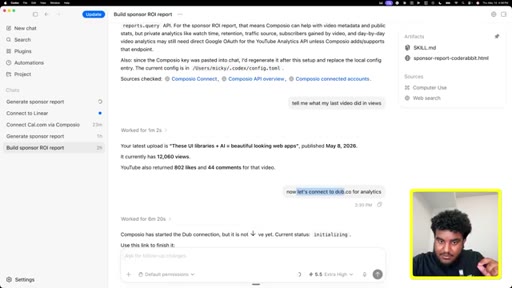
56:04Like, anyone should be able to do this. I wanna connect dub.co for my analytics.
56:10I've already connected Composeo. It's as simple as me telling it, let's connect. It gives me a link.
56:17I click the link, and then it connects it. In fact, here's the thing.
56:21And I'm glad I took a screenshot. I kept this. I
56:26clicked the link, and I went to the washroom. I had to freshen up for this interview.
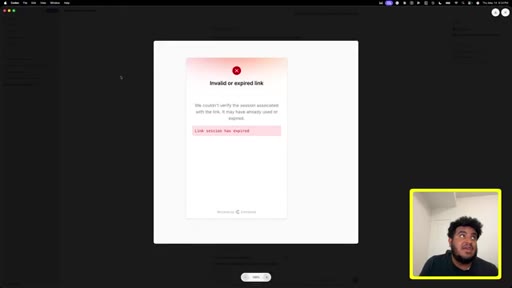
56:31Um, and I took too long, and it said invalid or expired link. Now the nontechnical person is probably gonna see this in panic. What do you do when stuff like this happens?
56:41You take a screenshot and you give it to the agent. And that's exactly what I did. I said, I even apologized.
56:47I shouldn't have, but I did. I said, sorry. I took so long.
56:50It expired. And then it said and it fixed it. And I asked for it to pull some analytics,
56:58and then it did. Right? So
57:01the basically, I'm what I what what the first step is you connect composing. Second is, how do you connect further tools? You literally just have a conversation.
57:09I'll show one more example so people don't think I'm crazy. Let's connect
57:16you know what? Linear. I'll connect linear.
57:18Linear is a tracking platform for developers on to track progress, like what you've shipped, what you haven't. So I'm gonna show you how easy it is to connect Linear.
57:28I'm just gonna start a new chat, and I'm gonna say, please connect to Linear.
57:35And I'm gonna send that. And we're gonna let the agent think, and the agent is going to give me,
57:43whether it be a link or a button to connect. So this is the first thing that I want people to do is just connect the tools that you use. Don't connect the tools you want to use.
57:52No. Connect the tools that you already use. Right?
57:57So we can see here, it's saying the linear tool namespace is available. I'm going to make it read only.
58:03Oh, I've already connected it before. So it's like, linear is is connected and OAuth is working. Verified Michael Schimulus,
58:10and these are the different teams I'm running. I said it all to say connecting Calum, I hope I make sense, is literally as easy as telling the agent.
58:19You don't have to write code. You don't have to do anything. You tell the agent.
58:22You check it, compose. You'll see if it has the tool. Right?
58:26See if it has the tool. If let's say I'm a Shopify store person. There's a Shopify connection.
58:31I can literally say I can go back and say, okay. Connect connect to Shopify
58:39now. And it's the same thing. It's going to check.
58:43It's gonna fire off Composeo. Composeo is going to give me a URL. I authenticate on that URL,
58:49and now I've given eight my agent access to Shopify. Does does that make sense before I continue on?
58:55Yeah. That makes sense. So beautiful.
58:57So I'll just create a new chat. I have a couple things connected. I have my YouTube
59:04analytics. I have my YouTube analytics. I have my Dubb connected.
59:08The one thing that I do is, again, I generate these reports. Now I've held off on this tool because this tool
59:17should only be discovered by people who are serious. And if you watch to this point, you're serious. There's a tool, I don't know if you're familiar with this,
59:24column called WhisperFlow. Oh, I love WhisperFlow. So I'm using the free tier.
59:29And the reason why I love WhisperFlow, WhisperFlow allows me to voice to voice to text with the agent. So I click on the function button on my keyboard
59:39and I can talk to it. So I can say, I want to generate a report that basically tracks
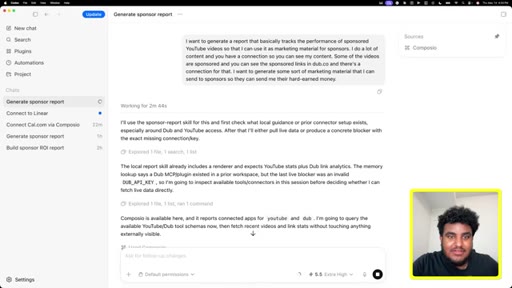
59:48the performance of sponsored
59:51YouTube videos so that I can use it as marketing material for sponsors. Basically, I do a lot of content
59:58and you have a connection so you can see my content and some of the videos are sponsored and you can see the sponsored links in dubb.co and there's a connection for that.
60:08I wanna generate a a report that basically or some sort of marketing material that I can send to sponsors so they can send me their hard earned money. Now typing that would have taken me forever.
60:20But what's cool about WhisperFlow is there's a lot of information here that sometimes it's hard to distill via typing because it takes too long. I will voice the text the heck out of this.
60:30Another thing that you mentioned, Calum, that I'll add and I'll just hit enter with this is you said, um, to voice to text your day, your thoughts, and I would 100% do that. Right?
60:40You can use Notion, some people use Obsidian, really documenting your work, right, via voice to text and then feeding that into an agent, you'll be surprised how lazy we are naturally, um, will help you a lot.
60:53Right? All these things are very simple, but when you put them together, you start to become very, very, very, very productive.
61:02I think talking, a, is a skill that everyone should have. So, I mean, using WhisperFlow almost, like, forces you.
61:09Um, but b, I find, at least for me, I get a lot of information out of myself when using WhisperFlow. Um, that being said, I typed in this giant prompt and this agent
61:20is added. Right? It checked Composeo.
61:23It checked the tools. It notices I have 50 recent uploads. It notices that I have 33 links, and now it's trying to match,
61:31um, the videos. Now this will probably fail. Now the reason why this will fail is I gave it too broad of a task.
61:38If it succeeds, I'll be surprised. If it fails, I'll understand why. And I I'm low key hoping it fails, but if it doesn't fail, then it's just proof that the agent is smart.
61:50But, essentially, what I did was not a good prompt. Yeah. My my my question to you, because you said I think that's really interesting.
61:56You said that you gave it too broad of a task. In your mind, kinda take people behind the scenes. What is the signal to you
62:05that you've given the agent too broad of a task? Okay. So give me sixty seconds of your time because you're gonna want to hear this.
62:12So I've done over 200 episodes of this show. I've been doing it for four years. In the last six months, I started to notice a shift in the conversations.
62:20Things that the guests would talk about was different. The common message was that we had entered this new period of time where the rules to be successful and have a great business and a great life had fundamentally shifted and changed.
62:33And so I started to realize that we had entered a new era. And so a couple of weeks ago, we launched a secret newsletter called New Era that pulls together stories, supporting documents,
62:46step by step guides, even unseen footage from the show, and we send it to you in your inbox every single week. And so if you wanna be involved, just go to the link in the description, plug in your email, and you will get an issue of our new era newsletter
63:02every single Monday in your inbox. Thank me later. Let's get back to the show.
63:06I'm glad you asked, and I have an example for that because I was hoping you're gonna ask it. So I basically, in this prompt said I wanna generate a report that basically tracks this. This is
63:16Pretty pretty general. But if I go to the last, where is it?
63:24Is this one right here, I want to show you one interesting thing. I'm gonna show you the steps I took it.
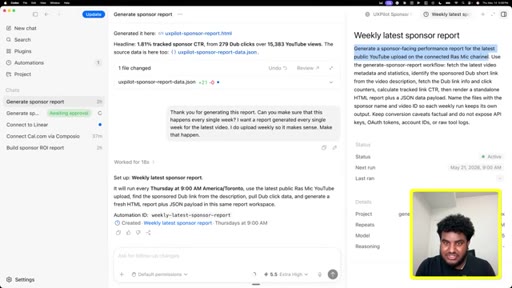
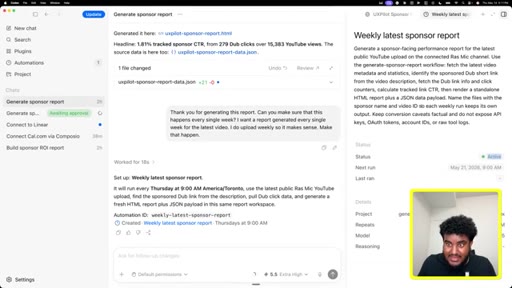
63:31So I first connected the tools. Right? So you can see here I gave him my API key
63:37and then it says it's configured. I told it asked it tell me what my last video did in views. This is a very simple prompt.
63:45I want my last video and I want the views. Can't get this wrong. It says it's currently sitting at 12,000 views, 800 likes, 44 comments.
63:55Simple. Right? Now the reason why I told it to do this is this action is in the context window.
64:02Meaning, uh, it's in the it's in the it's in the mind of the agent. The next thing I tell it is, let's connect to Dubb, which is my analytics platform. Gives me the URL.
64:14Remember, I I went to the washroom to fix my hair. Took too long. I said sorry.
64:18But then it connected it. And then look what it did. It says, I verified a sponsor link from your latest video.
64:24Because I asked it to check my video first and it knew that I wanted the analytics for some sort of analytics, it checked the link that matches. And it says here, oh, here are the current results.
64:36534 clicks. This is the destination.
64:39This is the last click. I'm not tracking leads or sales or sales amount. And then it did it itself.
64:45It's like combined with the YouTube number from earlier, the current sponsor CTR is 4.43%.
64:53Right? Now this prompt is going to feel lazy, and I'm going to tell you why it works.
64:58It's and I said, yes. Now do me a favor. Generate a clean looking page showcasing this number.
65:04This is for a sponsor. I'm allowed to be lazy with this prompt because I've given it context with the previous conversation.
65:13Right? It's like I don't have a perfect example, but it's like leading someone on.
65:19Right? First, you're like, you know, I really like your shoes. And then you're like, I really like your t shirt.
65:25And you're like, I really like your smile. At some point, you're gonna understand, yeah. This person really likes me.
65:29Right? That's essentially what I've done. Right?
65:31I first gave it access to my YouTube video views, and then I I gave it access to my analytics, and now I'm telling it
65:41generate a report. And what it does is and I oh, and here's the thing.
65:46I I I tell it to generate a clean looking page. Here's why I do it. When it generates this page, it's going to write HTML.
65:54HTML is, uh, is basically a file type. It's what a lot of websites render.
65:59This file type is great for agents. Agents excel with HTML and markdown files. I told it to generate this.
66:07If I click on this right here, you can see that it generated this report. You know, not too shabby.
66:13If I don't like the style, here's what's cool about Codex. They have an annotation tool. I can click on this annotation tool.
66:20I can select something, and then I can tell it I don't like this font. I don't like this
66:25k? So I can I can go pretty, like, specific with this, but I don't care? It generated this report and I liked it.
66:34Now here is where you don't download people skills, but you create your own. We had a successful run. So you know what I did, Callum?
66:41I said, see, this right here is a great report. And you could tell I kinda talk it to talk to like, I talk to homies.
66:49I say, can you turn it into a skill where I just tell you the video and you generate these pages? So I've given it what I want the end result to be, and I've told it what input it can expect from me. What input it can expect from me is a YouTube URL.
67:06What I expect from it is the is this right here. And this took a second. This took five minutes.
67:13And here's one thing I want people to realize. Sometimes, the agents will take time.
67:18And there have like, for example, in this instance, it was waiting for me to give it access and I didn't. So, right, I have to click allow and it's probably gonna keep on working. But going back to this example, and this is why I generate these examples ahead of time,
67:32because this video would probably been way too long. You could see it took its time. I could maybe work on another task.
67:39I could maybe do another thing. Again, this isn't my full time job. I have other work to do.
67:44But while this is happening, I could go do something else. After five minutes, it created you could see here, created the reusable skill.
67:52This is very, very important. The reason why this is important is the next time I want this done,
67:59which I have another example for you, I can tag it. So
68:04I can click at on the text box and you can see a bunch of these
68:11tags. Like, it it it it it it wants me to tag one of these things. All I have to do is click generate
68:16and you can see this skill. This is the very skill I created.
68:22So I created this skill and what I'm gonna do is I'm gonna show you actually an action. Yeah. Okay.
68:27This video was sponsored. I'm gonna copy this link, and I'm going to paste it.
68:32So let me paste it here. Remember, I told the skill earlier. Let me go back.
68:41I told her right here when I generate the skill, can you turn this into a skill? What is it turning into a skill? It's turning the workflow.
68:50Basically, the step by step I took. You see a lot of people, Callum, will tell the agent, I want you to do this, I want you to do that, I want you to do that. Turn this into a skill.
68:59Wrong. Have a successful run first because sometimes it will fail.
69:06Have a successful run first. Once you've had the successful run, because that conversation is in the AI's context, is in the agent's context, you're just going to turn it. We had a successful run.
69:17Turn this into a skill. These are the best skills. The best.
69:22The ones that you generate after a successful run. I'll stop here because I think you're about to say something. Yeah.
69:27Yeah. I am. I love how passionate you are about this.
69:29It's it's it's good, and and it's so useful. And it's interesting the the point in time that we're speaking at because, like, I'm learning a lot of this stuff right now. For people that are listening and might be unaware,
69:40can you explain what is a skill in, like, layman layman's terms?
69:47And then what if I'm looking to be more productive, make more money, save time, what is the value of using Skills?
69:55Skills, they're they're noted as skill dot m d files.
70:01What's interesting about Skill files is they will they will contain instructions on how to do a specific task. But here's what's interesting about it.
70:11The specific task, like the full task, the instructions of the task are not fully given to the model. Right?
70:18I'll even go a step granular. Every skill file contains the following three, the name,
70:25the description, and the steps. Right?
70:30The name is the name of the skill. The description is it describes what the skill allows you to do. The steps are whether it's code or a step by step instructions, that's what the agent follows to do set task.
70:45What's given to the agent when a skill is created is just the name and description. Why is this important? The reason why this is important is we don't wanna fill we don't wanna fill the mind of the agent with too much information.
70:58Remember, if you give it too much information, it's gonna be overwhelmed the same way you're overwhelmed and it's not going to perform well. Skills
71:06are a trick. Like, we don't wanna dump in every single instruction that we have and this is why skills are so important. It's minimal information
71:14that's called progressively, and when it's called, it gives all the steps. And all this is to make the agent more performant.
71:23Hopefully, that that makes sense. Yeah. So it sounds like it's
71:26minimal information that is still guiding the agent. Imagine having, um, this book and I have this book has all the information here, but all I know and that's stored in my head is is the chapters.
71:40And if someone tells me, oh, such and such chapter, I don't need to know it offhand. I'll just open a book, go to the chapter and read the specific thing. That's what the model does with skills.
71:50It stores the name and the description. It doesn't store the steps. But when it knows it needs the steps, it then reads it in.
71:57This makes it minimal. And you can think of this almost like a a computer, you know, the less the more memory you have, the more space you have in your computer, the faster it is. Right?
72:07The more stuffed it is with files and the closer it is to its memory, you start to see it slugs and it's slow and it lags. That's basically what skills do for models. It just gives it enough information it needs to know when it needs it.
72:20And when it needs it, it calls the entire thing. Yeah. No.
72:24That's really clear. I love that. So
72:27that's what was generated here. Now let's go back to the prompt I typed in here, uh, this one right here. I said generate a sponsor report.
72:36Right? I tagged the skill. Right?
72:38And how you tag skills is you type an at and you just type the name of the skill. In this case, this skill was named generate sponsor report. And I tagged and I gave it the YouTube video, and it says I'll generate a second report.
72:51I'm fetching the YouTube metadata. It's asking me does it have access to call these tools? I'm going to say yes.
72:57And what's going to happen is it's going to pull in the information. Notice how it's asking for another request. I'm going to say yes.
73:06And, again, if any of these lines don't make sense to you when you're using it, you copy this, you create a new chat, you paste, and you get answers. And now it has the metrics. You can see here, I have the live metrics, 15,000 YouTube views, 279
73:22tracked clicks. I'm creating a JSON payload, rendering the page as a standalone HTML page. So it has the information.
73:30It's now going to create this page. And in just a little while, the HTML page is rendered. I'm checking the output.
73:38Agents do take time. The smarter they are, the longer they will take. It says it's generated here.
73:44If I click, hopefully, this works. And there you have it. I have a repeatable
73:51process. Now let's say I wanted this done daily. What do I do?
73:57I go in my chat. I open up WhisperFlow. Thank you for generating this report.
74:02Can you make sure that this happens every single week? I want a report generated every single week for the latest video.
74:11I do upload week weekly so it makes sense. Uh, make that happen. And I hit enter.
74:18And now the model has a skill. It has access to my YouTube channel. What I've essentially created Calum right now is a weekly workflow where reports going to get generated.
74:29And notice how it's it's so simple. It's literally conversation. It did it right here.
74:37So it says set up a weekly latest sponsor report. It will run every Thursday, 9AM American Toronto time. And if I click on this right here, I can see information.
74:48The the OpenAI calls them automations to sound fancy.
74:52Um, and look what it it generated. It tell me it tell me here, generate a sponsor facing performance report for the latest public YouTube upload on the connected RossMike channel. Use the generate sponsor report workflow.
75:05Remember, we generated it earlier. Fetch the latest video metadata and statistics. Identify the sponsored dub short link from the video description.
75:13Fetch the dub link info and click counters. Calculate track link CTR, then render a standalone HTML
75:22report plus a JSON data payload, name the files with the sponsor name and the video ID so each weekly run keeps its own output. Keep conversion caveats factual.
75:33Do not expose API keys, OAuth tokens, and account IDs or raw tool logs. This is going to run the next one it says here, 05/21/2026 at 9AM, the status is active.
75:45This is going to happen every single week. Now how I built this, I didn't see someone on YouTube build this and copy them. I built this on based on what's useful to me.
75:53So connect your tools. You can use OpenAI's native plug in marketplace. If the tool doesn't exist there, which most likely won't, you connect Composeo.
76:03Composeo is as easy as going to the dashboard, taking a screenshot of the instructions, giving it to Codex, and saying connect.
76:10It will do it. And then after that, ask yourself what tools do I use? Ask the chat.
76:15I want to connect to this tool. Every time you ask to connect to a specific tool, it will give you a link, you will authenticate, it will bring you back and now the agent has access to it.
76:25Then you can enter discovery mode. I want you to do this, I want you to do that, I want you to do that. And when you realize a couple of the steps that you did, you want it to be done consistently,
76:34what are you going to do? You're going to turn this. You're going to tell it itself, turn this to a skill.
76:40Once it's a skill, it's become a workflow. And if you want it to happen on a consistent basis, nothing fancy here.
76:47I literally said thank you for generating this report. Can you make sure that this happens every single week? And guess what?
76:53It set up an automation and it does this every single week now. So on May 21, next week, 9AM, I'm going to get a message from Kodak saying here is the latest report. Yeah.
77:03You know you know what, Mike? It's so good, and and thank you for sharing that. And the reason I say it's so good is because of what you mentioned in the beginning, which is that it's simple.
77:12It's not 50 different agents in these, complex workflows and demos. It's very simple. And so when you and I spoke, I actually wrote down three steps,
77:24which is basically step one, you you're using a codex, you connect it to composeo. Step two is pick a real task that you do every day or every week,
77:37and you coach the model step by step. So you go through that workflow step by step with the model first so that you get, like, a great output.
77:48Then once you've got a great output from the agent, you then tell the agent to turn that into a workable skill, and then you put it on some sort of repeated cadence.
77:59You know what, Mike? So I'm gonna ask a a selfish question here. Because
78:05back to my experience of using Claude Cowork and, like, reflecting on it, because it was a frustrating and, like, a demoralizing experience.
78:14Because I spent hours setting it up, and then the output that I got wasn't useful. And the funny thing is, it told me at first, it's like, yeah, it won't be great at first, but it'll get better over time and all this stuff.
78:27And what happened in my experience, because I didn't get a great output to begin, I didn't really use it moving forward because I knew I wouldn't get a great output.
78:38And so when we talk about the steps, I think that step two of
78:45people understanding kind of how to coach the AI agent initially
78:51to give them a great output, that is the key step. Because once you get the great thing,
78:57then it's so easy as you've just demonstrated to turn it into a skill. But I'm curious for you, can you talk about your experiences
79:06of getting a mediocre output or like a suboptimal and average unusable output
79:14from this process? And then what are you doing to actually make it good so that further down the line you can then turn that process into a skill? Yeah.
79:25So I, uh, grew up in an African household, uh, which means if my grades were an a plus, I got b.
79:34Right? And some might call this craziness, but now I look back at it and this was just a great feedback loop.
79:40I do good, I don't get beat. I do bad, I do get beat. I
79:43bring that example up because you are going to have runs where again, I'm gonna use this diagram so it's super, super clear.
79:51You're going to have runs where you are just going to be frustrated because what the agent gave you, what you you gave it a good prompt, what feels like a good prompt, and what it gave you was pretty mediocre. What you are going to do is you are going to continue to work on it recursively
80:12as if it was an annoying family member that you're stuck with but are frustrated with. What do I mean by this? Most of the times,
80:20the agent will probably mess up. Right? Um, the models are getting better so luckily it worked out on our end.
80:26But let's say it messed up. And in this case, there was a perfect example of actually not even it messing up, but I think me taking too long.
80:35If I go back here, I took too long and it expired. And I know for a fact most people would see this and would just panic and would probably give up.
80:46What I want you to do and this is depending on the task might be time consuming is you recursively work with it. Meaning, you tell the output that it's giving you is wrong and it needs to itself.
80:59So let's say tries to connect to something and it feels connecting. You're going to tell it you failed at connecting at it, please fix this. You'd be surprised by the third or fourth time it figures it out because each time we'll probably try a different strategy doing so.
81:14When it comes to creative work, this is probably the most painful because in creative work, um, the sauce is not trained into the model. Right? Your specialty,
81:23your flow, your cadence, and I know there are a lot of people that are like, oh, I'm fine tuning a model so it sounds like me. Um, humans are very unique in where a lot of the things we do are very subtle and are very hard to replicate,
81:37uh, by a machine. So when it comes to stuff like that,
81:42the feedback loop that you're going to give it is the same loop that like my parents did. You do good, we create a skill.
81:50You do bad, we continue to work with you until you create a skill. It's literally just back and forth and and this is why I'm saying like the models have gone really good. The models are so intelligent now where if you tell it this was the wrong way and then you show it the right way or you go back and forth and it does it the right way and you create a skill, guess what happens?
82:11In the skill, it will write, I tried these different ways and this was wrong. The person didn't like it or it didn't work. Never use this method again.
82:20Right? So step two to your point and you put it perfectly is the most important and it's probably the time you spend the most.
82:27Now, if it feels frustrating, I want you to think of this as a human that's being trained on the job and you would have a little bit of compassion with a human. Hope at least you would be nice to someone who just started working for you.
82:38In the same way, I'm not saying be nice to the model but understand there might be a little training that's required. Once you have that back and forth and the back and forth is simple, it's just prompting. It's just communicating with it.
82:49Something breaks, you tell it it broke. Now let's say compose you. Let me give you an example of how I would fix an issue.
82:55Let's say Composio went down and now Composio is just no longer a company. I would go on the agent and it'd be like, I want you to search the web and find a greater Composio alternative and instruct me on how to set it up.
83:08I would go then set it up and if it breaks, again, I would continue to prompt back and forth and that's one thing I want to encourage people. If something isn't working, prompt the AI. If that isn't working, prompt AI.
83:21If Codex isn't working, prompt Claude. Prompting is where you fix a lot of the issues you might get in a workflow that's not working correctly. For some of you, it might be one shot, which praise God that works.
83:35But for some, it might take a couple of tries. Hang in there. Continue to work with it.
83:41Once it has a successful run, you're going to have the best skill of life. Yeah. No.
83:47Mike, the the analogy of, like, the the African or, like, the immigrant parent is, very vivid to me. But you know what?
83:57It's it's it's a it's a great one. And so I wanna kinda go behind the scenes of your process for a second. So you get, like, a bad output from your agent, and and you correct me if I'm wrong in this.
84:09You're hitting whatever that key is that activates. So you're like studying the output first of all.
84:15Like, you're looking at what it's given you. You're then hitting that key that gets you to whisper flow and you're like dictating out
84:24what was wrong or what you want corrected in the output, you're doing this process
84:32repeatedly until you actually get to a good output. And then the instant that you get to a good output, you're like, okay.
84:39Save that workflow as a skill. Is that correct?
84:43That's that's exactly it. That's the that's the step by step summarized perfectly right there.
84:49Right? Because it has all the perfect inform it has all the right information in context. I just want it to be turned to skill as soon as possible.
84:57Yeah. You know what? One one final thing, Mike, because you've been so great.
85:01When you set it up on this reoccurring basis and you walk people through how they can do it so it actually you know, every week, it delivers this. Where is that output going to,
85:13and do you control that? So for example, are these sponsor reports I don't know. Before you even send them out, is it going is it like an email that it's sending you?
85:23Is it, uh, uploading it onto, like, your computer, like, a local drive? Um, where is it going typically for you, and what have you found
85:33works best when you're using an agent? So when you use something like Codex, Codex can do all of the things you just mentioned. Right?
85:41So I can have it just pop up in the chat. Right? Like like, just message me in the chat when something's done.
85:47Because if Codex is important to my business, then probably have this thing open or I'm using it regularly. So it could do via chat. I can also tell it to email me.
85:56Right? Again, all it would take is and this is what's so cool. All it would take is for me to connect my email and tell it, oh, send it to me.
86:04Right? Alert me. Um, there are even tools that can allow you to connect it to a telegram or to all this stuff and how do you like, how would I go about setting this up?
86:14Check this out. Prompt it. I want you to send this information to my telegram or to this or to that and it will do it and that's the cool part about these apps.
86:23So I say that to say, if you want the information delivered to you via email, tell it.
86:29You want it in a specific folder in your file system, tell it. You want it uploaded on Google Drive? Tell it.
86:36It'll tell you to connect and you could do it. You want it sent to you via telegram? Tell it.
86:40How you want things delivered is completely and utterly in your fingertips. The power is in your hands.
86:46It's just as simple as prompting it. Yeah. And it's so good.
86:50CTAWhat have you found is what's best for you? I'm a I'm an iPhone guy and I really like Apple. I I I really like iMessage.
87:01CTASo I have, like, my own I I can show it here, but, like, this is, like, my own agent.
87:08CTABut I think if you're starting out, I would really focus on using the app and getting used to the app because the app has so much functionality. Like, another thing, and this is just a side quest that people can do is you can type at and I believe I can click like build. Yes.
87:25CTAI can tag build iOS apps, which is like a plugin they have, and I can say, build me a to do list app that looks like, uh, the Apple native reminder.
87:36CTAAnd I also want you to add light mode, dark mode toggle. Right? And then I can hit enter,
87:43CTAand I can let this work. I can work on another task. Right?
87:46CTAI think there's value in getting used to the app, right, especially if you're new. Focus first on the app. Get good at it.
87:55CTAUse it. Tinker around. Click all the random things.
87:58CTATouch all the settings. Like, just, you know, use it profusely. And then once you've got to a good stage, then you can worry about, okay.
88:04I can connect it to my iPhone to this to that. Because I find that a lot of people will do all the unproductive stuff that's cool and then be like, oh, I just wasted so much time.
88:14Like, all of this was kind of, like, useless. Right? But if we scale for productivity,
88:19make the productive thing first, then it just becomes something you're stuck with. Like, I can't stop using agents because they make me so productive.
88:26Right? So that's how I would think about, like, where to use and how to use the things.
88:31I would stick to the app first. Yeah. I'm curious for you, reflecting on kind of what you've experienced and getting to the point that you are now,
88:41what would you say to the person that's listening? If they had to take one thing from this conversation and even really just from hearing your story and experience,
88:52what would you hope is the one thing that they would take from you? Yeah.
88:57Like, I I genuinely think all the information you have is available. Right?
89:04It's there. It's on YouTube. It's on Twitter.
89:07It's on it's it's it's all there. Right? What is important is consuming information and then acting upon it.
89:15Right? A lot of people, um,
89:19will consume and not do. And I've done this before. I've been like a tutorial junkie before where I'll watch a bunch of tutorials on how to do x y and z.
89:28And it and there is a dopamine rush in learning something new, uh, but that can also be a mistake because you want to actually do. Right? So I would consume information and do.
89:37I would consume information and do. And I found that especially in my own personal experience after a certain amount of time, at some point, you become
89:46better than what's average. Right? Like, I remember in August 2022, I decided to take, um, Harvard had this has this free course called the CS 50, which is like an introduction to computer science program.
89:59And it's like an eight week program. And it was probably the most, like, humbling, borderline humiliating
90:07thing. And by the way, look, the app is being built itself while we talk. That's so cool.
90:11Yeah. It it it was very humbling and and, like, I almost felt embarrassed because I I I just didn't feel I could keep up. Like, it was so hard.
90:18It was so difficult, but I stuck stuck to to it it and and that that led led to me building my first few apps. I sucked at it.
90:26I stuck to it. That led me to starting a startup. That startup did really, really well.
90:31I stuck to it. But then I had a feud with a business partner. I ended up leaving the company with no equity, no cash,
90:39no money even though that business was doing like couple million dollars a year. I stuck to it. Right?
90:44And then I got my first corporate job. It was annoying, but I stuck to it. Right?
90:48So there's just like this consistent nature of like sticking to this idea of learning and improving, learning and doing, learning and improving, learning and doing.
90:59And it never happens right away, but you'll realize at some point whether it's a year, six months, two years, at some point you'll realize, oh, you're a lot more smarter than you used to be and you're a lot more valuable than you are. And like that's the big thing. Right?
91:13Like when a lot of people like, oh, these tools are scary. This is even if it feels like a technical tool, so what? Try it.
91:20You know what mean? So what? You you don't know how to cope.
91:22So what? Give it a try. Use AI.
91:24Ask. Fail. Try it and if it sucks, it sucks.
91:27Right? But at least try. Another thing I'll say is and, like,
91:33like, a lot of one thing that grounds me is, like, I my faith grounds me. You know, I I have motivation. I have a family I need to take care of.
91:41Right? So aligning all these things together makes it so that, like, yeah, there's some things that I don't understand.
91:49So what? There are lot of people who don't understand. Let's go learn it.
91:52Let's invest time. Whether it's buying a book, whether it's watching some videos, whether it's trying it out, whatever it is, whether it's paying for somebody's time, the information's out there.
92:01It's just a matter of who's going to do the work, and unfortunately, most people won't do the work. Mike, man, thank you so much for coming on and being so open and not gatekeeping.
92:14I really enjoyed this conversation. I I and I appreciate you having me and, you know, for sharing. Just to show everybody, I know we're closing up, but, like, yeah, the the the app's done and, like, that was one prompt.
92:26So, like, you have access to this. There should be no reason why you don't try. At least try.
92:31But, yeah, Calum, I really appreciate the opportunity and the time, and, yeah, thank you for for allowing me to be here. Yeah. It's pretty crazy that, like, as as we're talking,
92:40the the AI, like, the the agent is just building the app and it's, like, popping off on the screen. Uh, that's cool.
92:48Yep. That's cool. Thank you, mate.
92:50That was great. Appreciate you, Callum. Thank you.
92:53So So if you enjoyed this conversation and you wanna hear even more stories like this, then just click here. And also my team is gonna put some more videos that you can watch here. Thank you.
— full transcript
§ 05 · For Joe

The four steps between an idea and a working automation.

WHAT TO LEARN

Building a useful AI agent is a coaching job, not a configuration job, and the order of operations matters more than the tool you pick.

  • AI models have no agency and no relationship context; they respond to the literal quality of instructions the same way a junior employee with no initiative responds to a vague task.
  • Starting with someone else workflow is a mistake because you inherit their context: their tools, their data sources, their edge cases. Your workflow has to start from your own repeated tasks.
  • The context window is a resource: building toward a complex output in small confirmed steps means the final prompt can be brief because all the prior steps have already loaded what the model needs.
  • A skill only earns its place after a successful run. Saving a failed session as a skill just encodes the failure into a repeatable process.
  • Discovery mode, connecting your tools and asking the agent what patterns it sees, surfaces blind spots you would not have thought to automate because you did not know they were problems.
  • Recursive prompting is the fix for bad outputs: tell the agent what was wrong, ask it to try again, repeat until one run succeeds, then immediately save that run as a skill.
  • The gap between what you pay for an AI subscription and what the compute actually costs is the hidden variable in platform comparisons; generous rate limits mean more practice iterations per dollar.
  • Consuming information without acting on it is a different kind of procrastination; the dopamine of learning new things substitutes for the friction of doing them.
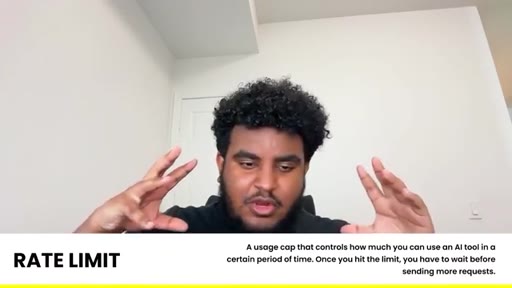
§ 06 · Frame Gallery

Visual moments.