Mark Kashef · Youtube · 23:17

Claude Code Agent Teams Explained (Complete Guide)

A 23-minute illustrated walkthrough of how agent teams work in Claude Code, when to use them over sub-agents, and how to build a live surveillance dashboard to monitor your fleet.

Posted
February 8th 2026
3 months ago
Duration
23:17
Format
Tutorial
educational
Channel
MK
Mark Kashef
§ 01 · The Hook

The bait, then the rug-pull.

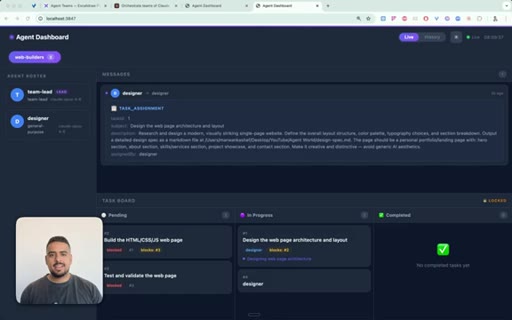
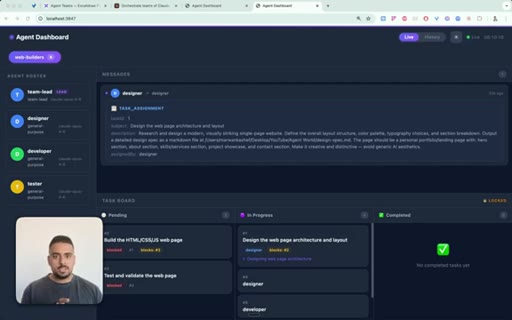
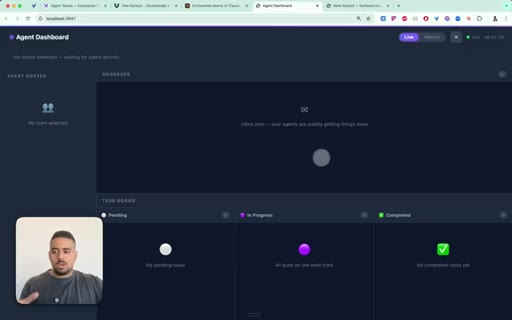
Before Mark Kashef says a word, you are looking at something most Claude Code users have never seen: a real-time dashboard showing a team lead delegating to a designer and a developer, messages streaming in, a Kanban board updating live. Instead of just looking at JSON files or markdown files, he says, I built a system to give me full surveillance. That dashboard is the promise of the entire video.

§ · Stated Promise

What the video promised.

stated at 01:15 "I'm gonna walk you through how the agent team infrastructure works so you can leave this video understanding where to use it, when to use it, and how to actually surveil your agents." delivered at 23:17
§ · Chapters

Where the time goes.

00:00 – 01:15

01 · Live dashboard demo

Shows the custom localhost surveillance UI: team lead + designer + developer Kanban board, real-time message streaming, history tab.
01:15 – 01:52

02 · Token cost warning

Do not use teams frivolously. Only for complex recurring tasks. Token burn is the main risk.
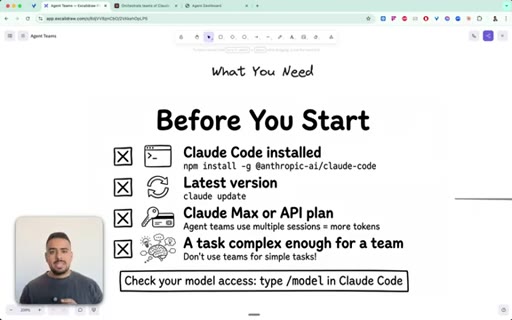
01:52 – 03:17

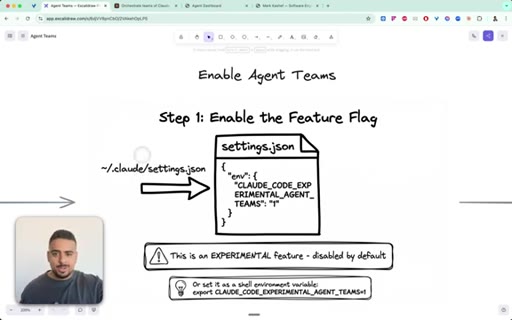
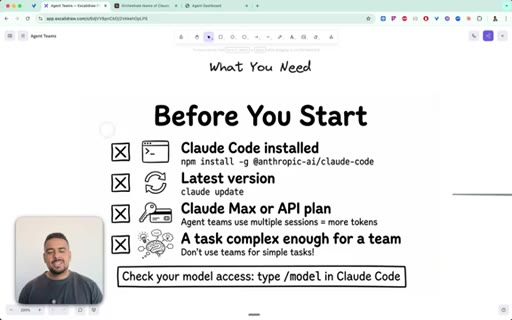
03 · Setup: enabling the feature flag

Set CLAUDE_CODE_EXPERIMENTAL_AGENT_TEAMS=1 in ~/.claude/settings.json. Cheat code: paste Anthropic docs into Claude/Warp and let it configure everything.
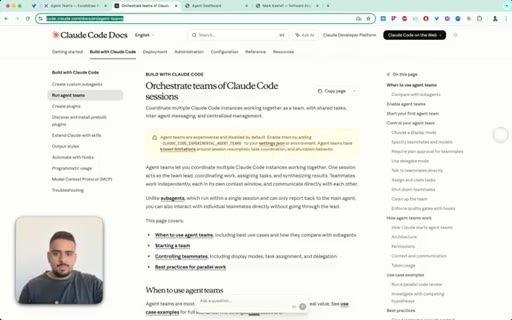
03:17 – 04:23

04 · Verifying access

Ask Claude do you know how to spin up agent teams? If it lists TeamCreate, TaskUpdate, SendMessage, TeamDelete tools, you are configured correctly.
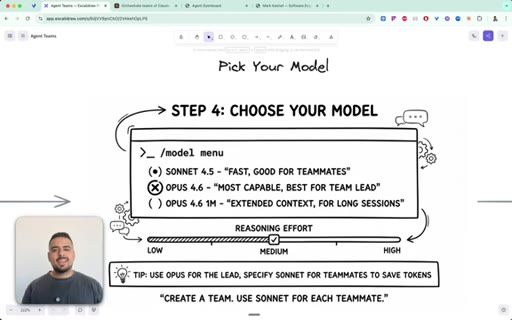
04:23 – 05:09

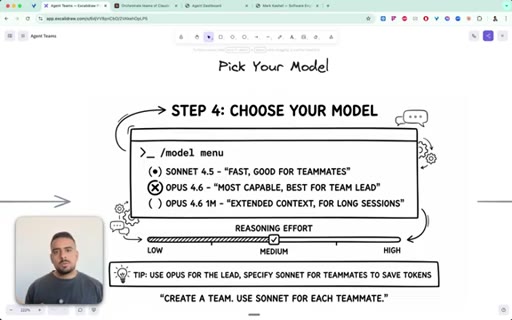
05 · Model selection

Opus 4.6 for team lead, Sonnet 4.5 for teammates. Rule: create a team, use Sonnet for each teammate.
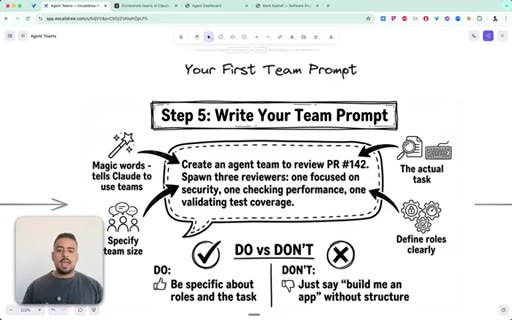
05:09 – 05:36

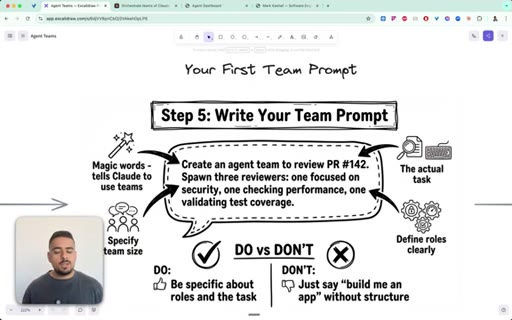
06 · Writing the invocation prompt

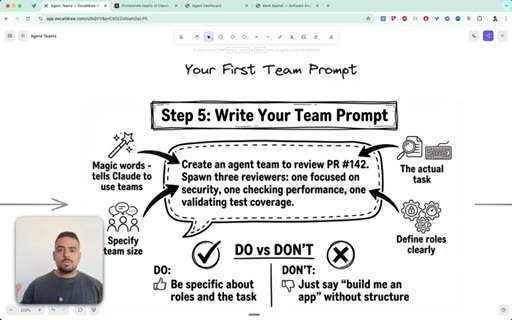
Magic words: create an agent team to review PR 142, spawn three reviewers. Define roles explicitly.
05:36 – 07:10

07 · How teams work: architecture

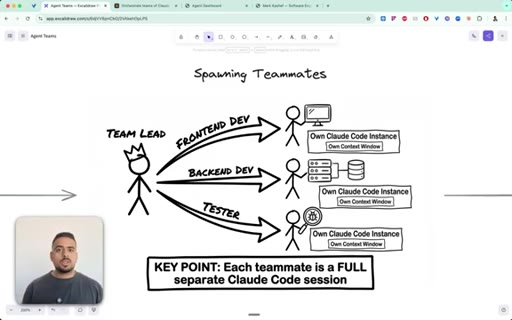
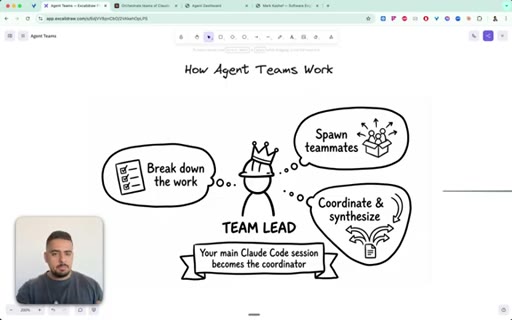
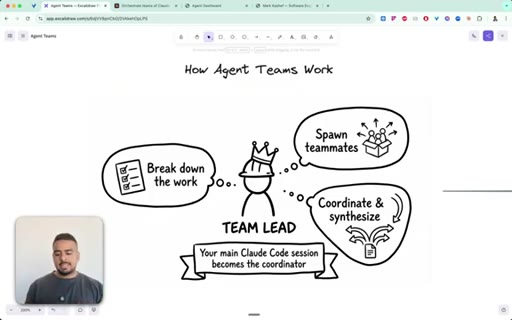
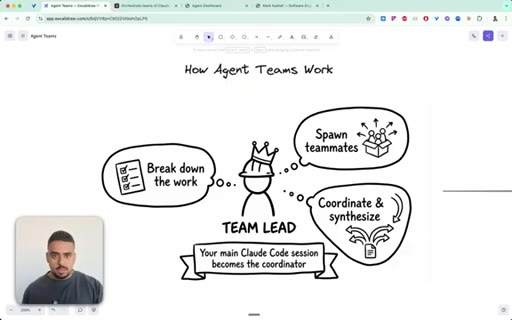
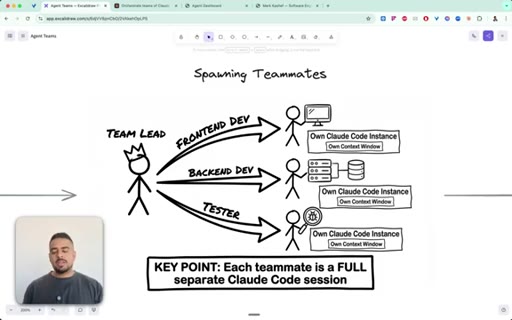
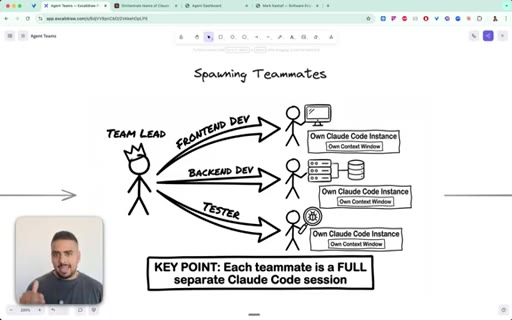
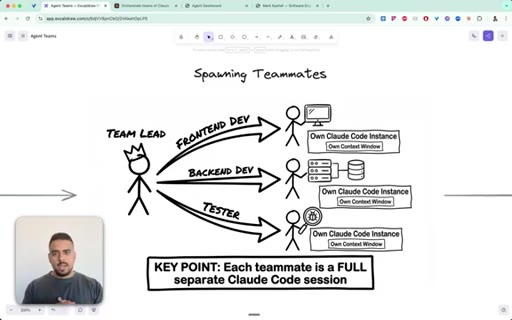
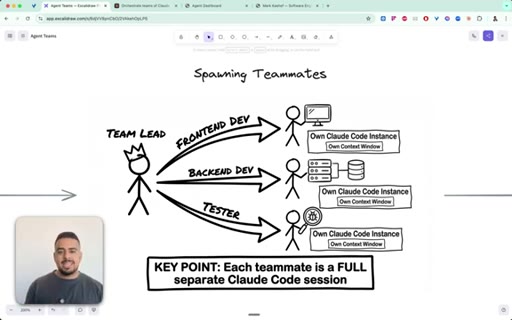
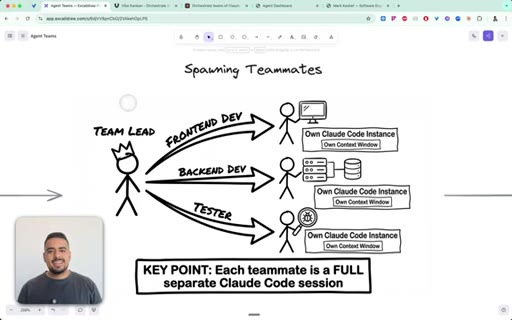
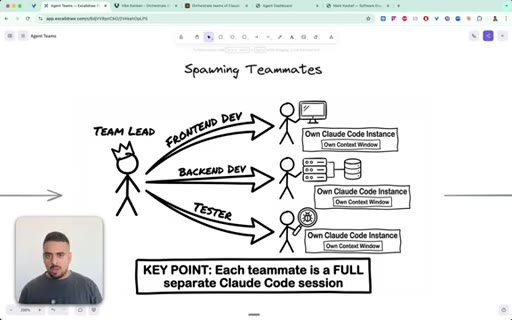
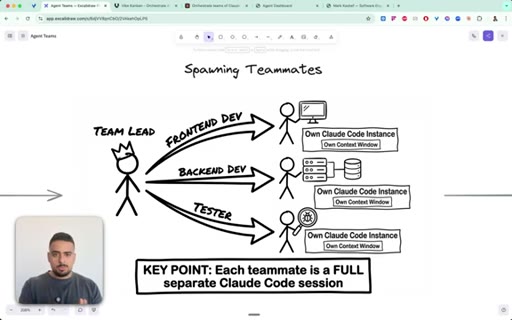
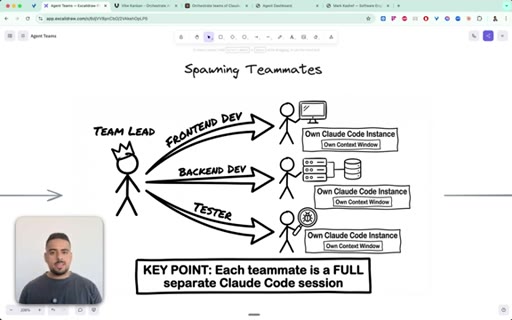
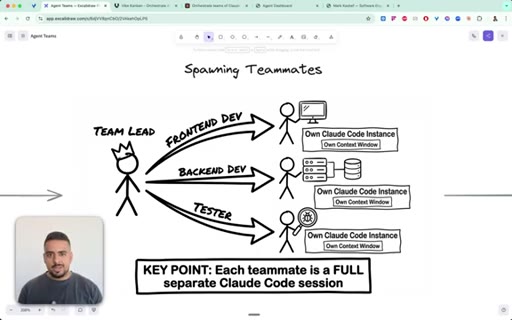
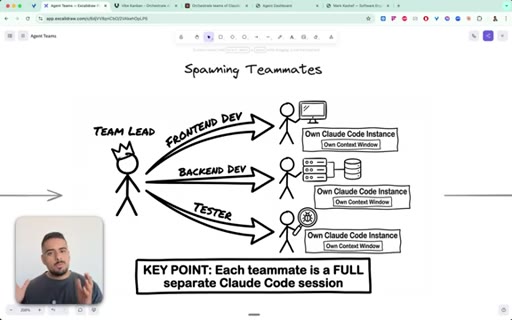
Team lead breaks down work, spawns teammates (each a full separate Claude Code session with its own context window), coordinates via shared task board.
07:10 – 08:54

08 · The messaging system

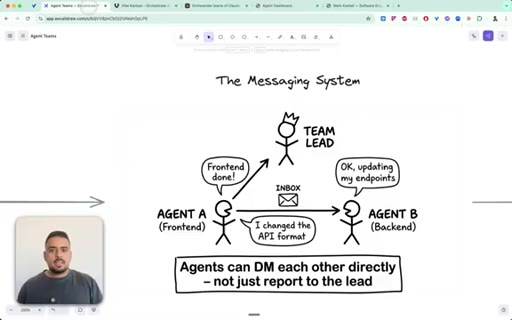
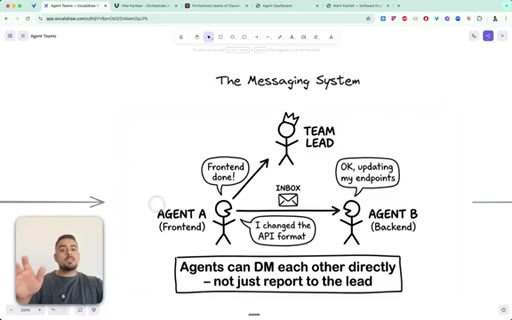
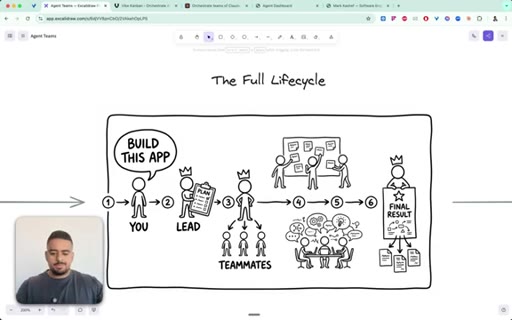
Agents DM each other directly via inbox JSONs. Frontend agent notifies backend; both report up to team lead. Full lifecycle: 80K tokens for a one-shot web page.
08:54 – 10:48

09 · Display modes

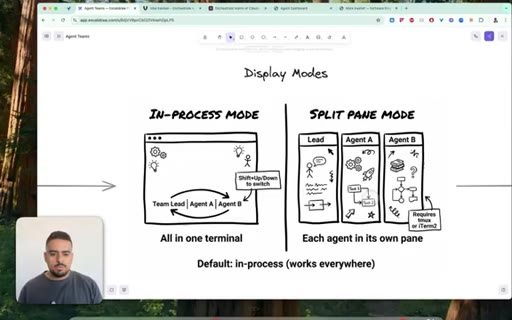
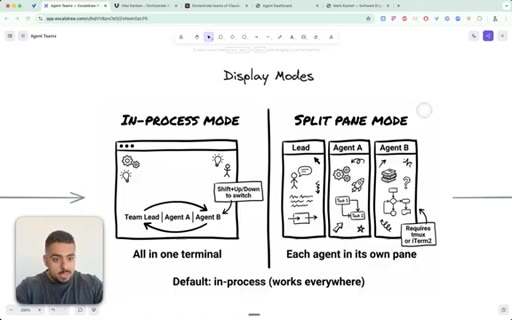
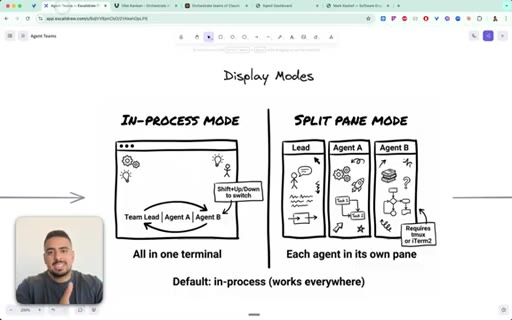
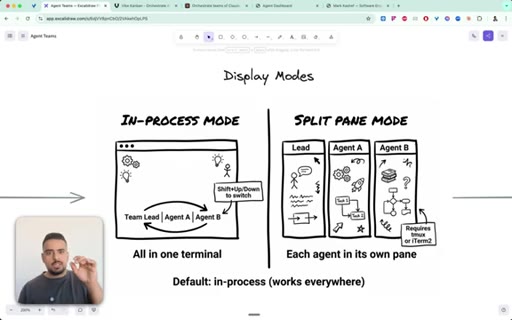
In-process mode (default, all in one terminal) vs. split-pane mode (each agent in its own TMux pane). Custom dashboard is the third option.
10:48 – 12:35

10 · Sub-agents vs. agent teams

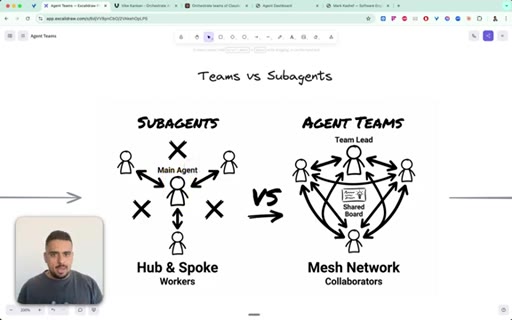
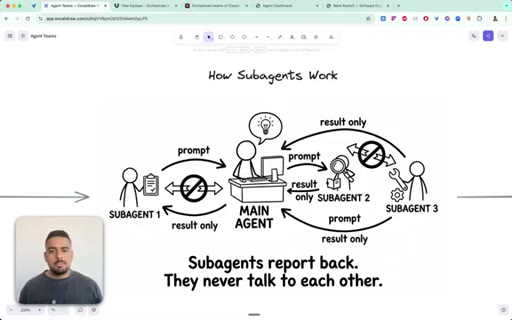
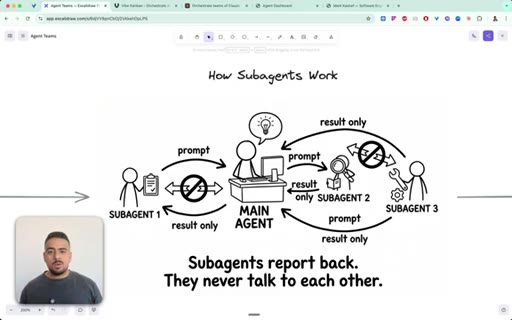
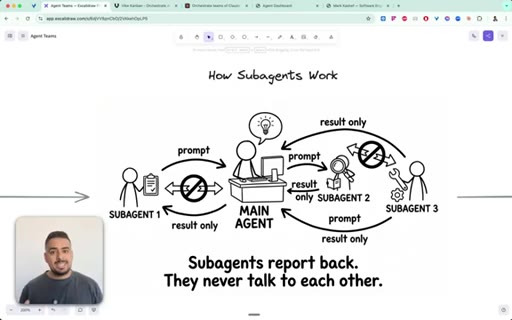
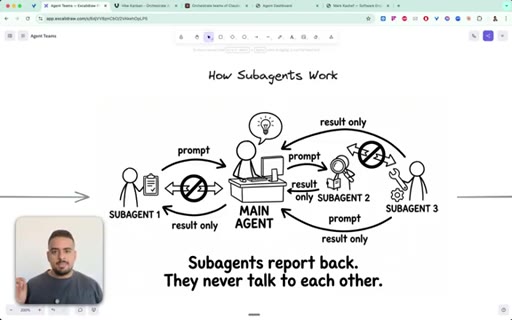
Sub-agents = hub-and-spoke (report to you, never talk to each other). Agent teams = mesh (peer DMs, shared task board, can challenge each other).
12:35 – 15:13

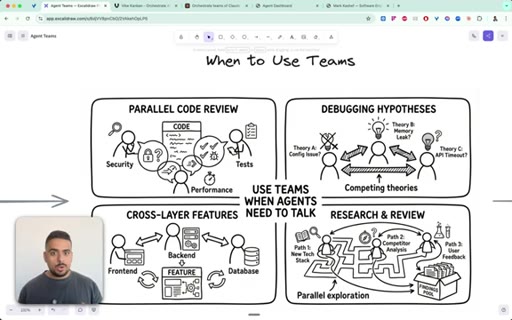
11 · Four use cases for agent teams

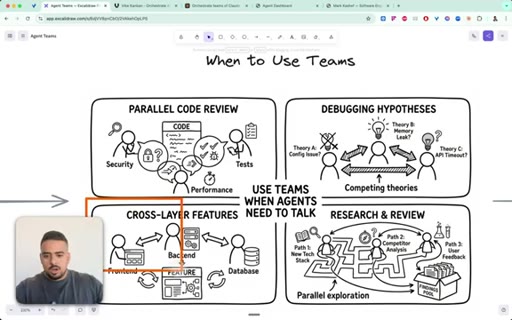
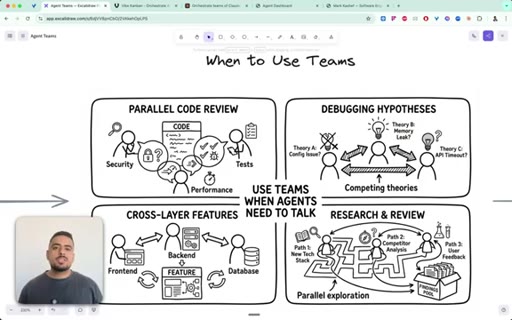
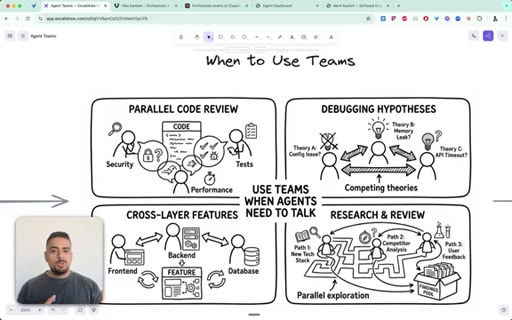
Parallel code review (stuck-at-85% projects), cross-layer features (frontend/backend/database), debugging hypotheses (competing theories), research committees.
15:13 – 16:37

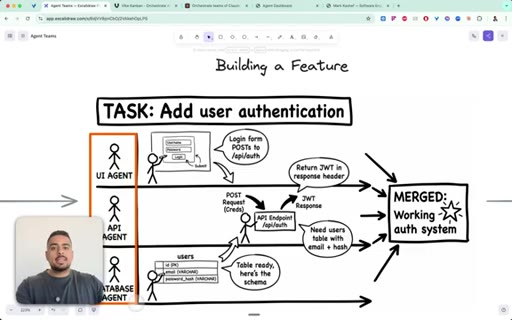
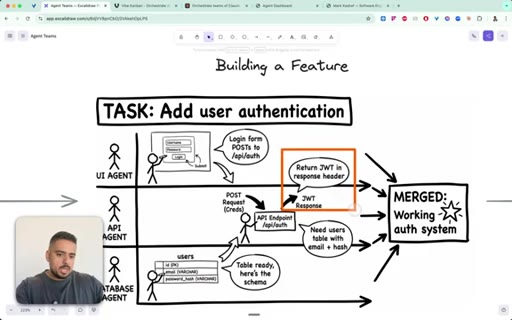
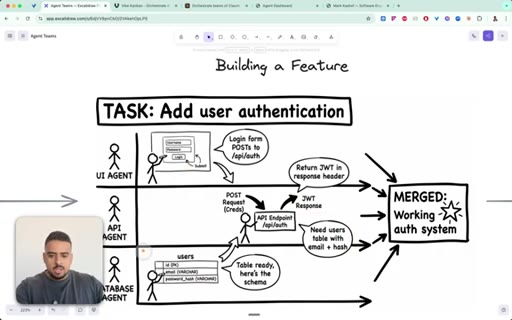
12 · Applied: building auth with three agents

UI agent scaffolds login page, API agent creates endpoint, database agent creates users table. Chain completes to a working auth system.
16:37 – 17:31

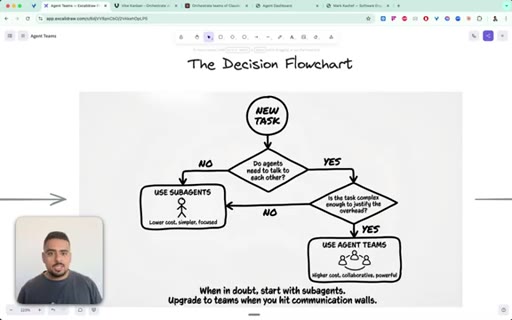
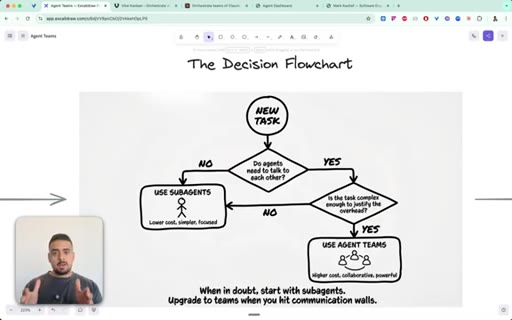
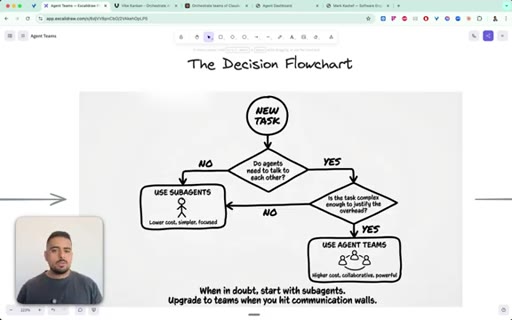
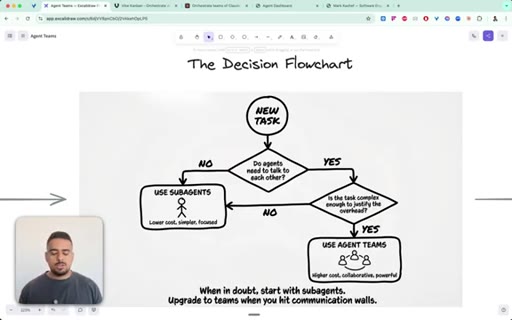
13 · The decision flowchart

Do agents need to talk to each other? If no, use sub-agents. If yes, is the task complex enough? If yes, use agent teams.
17:31 – 18:56

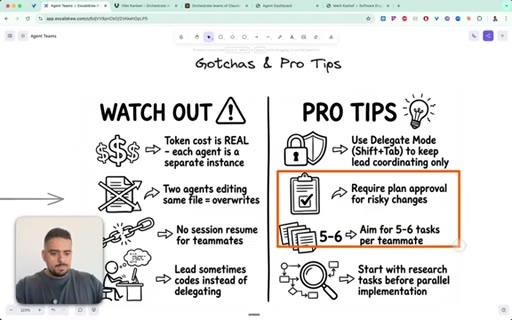
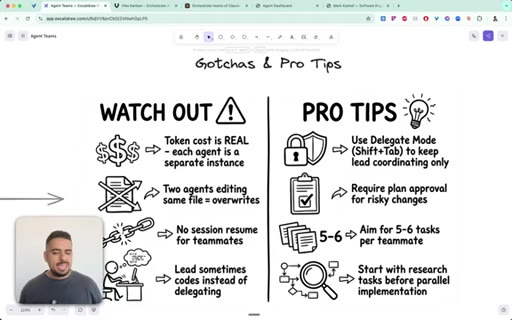
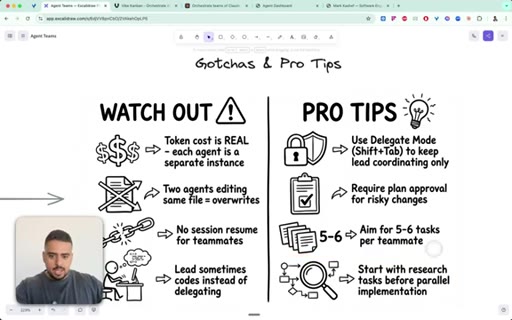
14 · Gotchas and pro tips

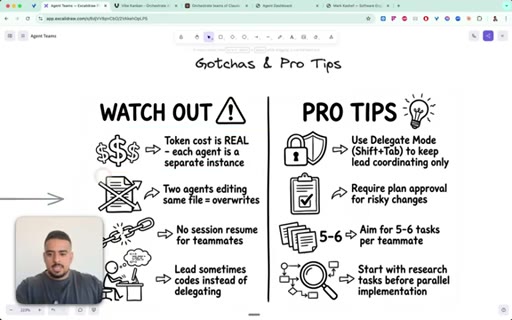
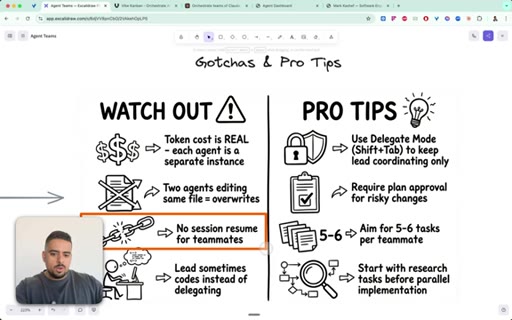
Token cost 100K-300K per run. Agents can overwrite the same file. No session resume. Lead sometimes codes instead of delegating. Use Delegate Mode, require plan approval, aim 5-6 tasks per teammate.
18:56 – 21:40

15 · File storage map and messaging protocol

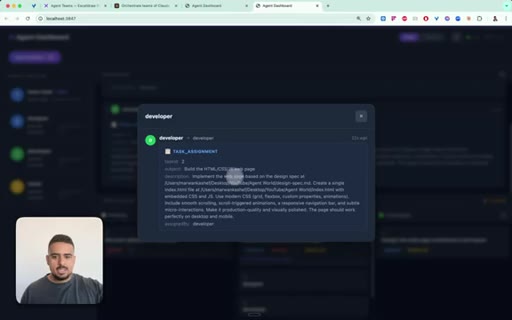
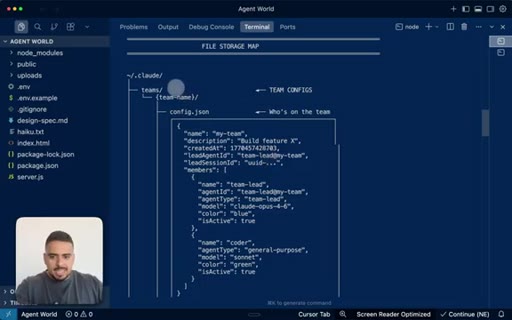
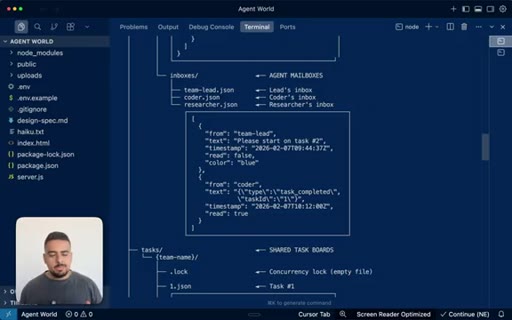
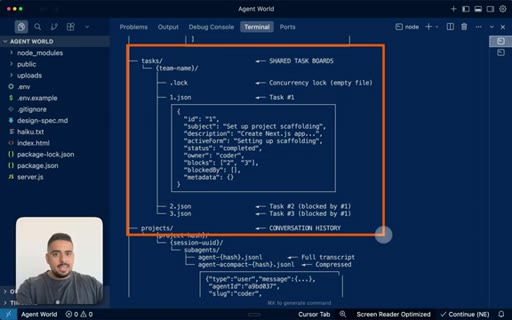
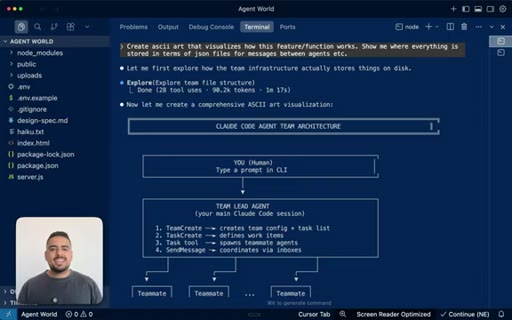
~/.claude/teams/<name>/config.json (who is on the team), inboxes/<agent>.json, tasks.json. Protocol types: task_assignment, task_completed, shutdown_request, plan_approval_request.
21:40 – 23:17

16 · The surveillance skill demo

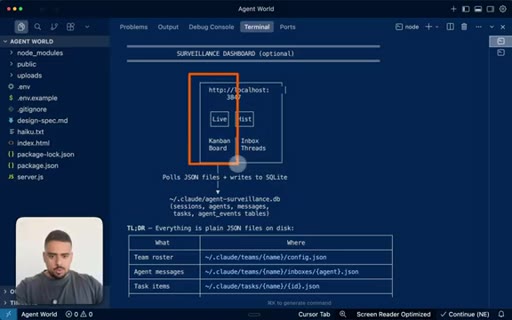
Dashboard is a Claude Code skill: say surveil my agents and it spins up localhost:3847 with live + history tabs, Kanban board, inbox threads, SQLite persistence.

§ · Storyboard

Visual structure at a glance.

live dashboard
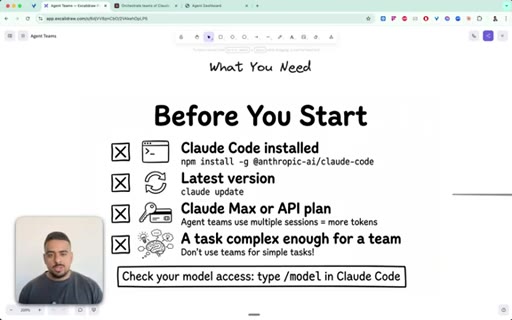
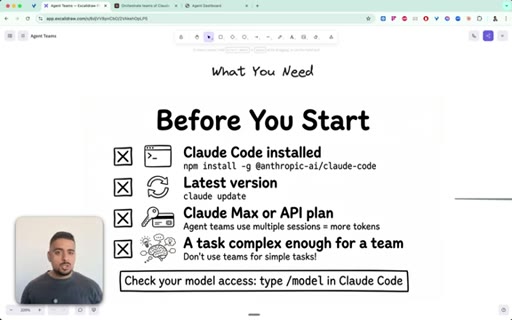
prerequisites
feature flag
model selection
team architecture
messaging system
sub-agents vs teams
use cases
decision flowchart
gotchas & pro tips
file storage map
surveillance demo
§ · Frameworks

Named ideas worth stealing.

16:37 model

The Decision Flowchart

  1. Do agents need to talk to each other?
  2. If no: use sub-agents
  3. If yes: is the task complex enough to justify token overhead?
  4. If no: use sub-agents
  5. If yes: use agent teams

Two-question decision tree for choosing between sub-agents and agent teams. Default to sub-agents; upgrade to teams when communication between agents is the bottleneck.

Steal for Prompt template, Claude Code cheat sheet, short-form explainer
12:00 concept

Hub & Spoke vs Mesh

Sub-agents form a hub-and-spoke network (you are the hub). Agent teams form a mesh network where any agent can message any other, enabling competing hypotheses and cross-layer contracts.

Steal for Any content explaining agent architecture tradeoffs
04:23 concept

Model Allocation Rule

  1. Team lead: Opus 4.6 (highest complexity, manages others)
  2. Teammates: Sonnet 4.5 (fast, saves tokens)
  3. Long sessions: Opus 4.6 1M for extended context

Assign most capable model to the lead; use cheaper/faster models for workers. Same logic as hiring: senior lead, junior executors.

Steal for Agent architecture guide, pricing explainer
21:40 concept

Agent Surveillance Skill

A Claude Code skill that spins up a localhost dashboard (always port 3847) showing live agent activity via SQLite-backed streaming of inbox JSONs and task boards.

Steal for JoeFlow agent monitoring, any orchestration UI
§ · Quotables

Lines you could clip.

01:00
"Unlike before with sub agents, they worked in parallel, basically would give you the TLDR of the result at the very end, but there's no interplay in between the different agents."
Clean contrast statement, no setup needed, lands the key product distinction → IG reel cold open
18:06
"When in doubt, start with subagents. Upgrade to teams when you hit communication walls."
Standalone rule, zero context needed, highly quotable → TikTok hook / Twitter pull-quote
18:33
"You could spend anywhere between 100 to 300,000 tokens just spinning up and executing an agent team."
Concrete number, practical warning, builds credibility → Newsletter pull-quote
15:12
"It's literally like having a possible committee go through and vote on what the problem is to get to the bottom of it."
Memorable metaphor, no setup needed → IG reel cold open
18:33
"The team lead could end up coding instead of delegating. Now you could see it stepping on the toes of its subemployees."
Humanizes the failure mode with workplace language → Short-form hook
§ · Pacing

How they spent the runtime.

Hook length75s
Info densityhigh
Filler3%
§ · Resources Mentioned

Things they pointed at.

09:24toolTMux
07:10toolVibe Kanban (open source)
§ · CTA Breakdown

How they asked for the click.

22:20 link
"If you want access to all the diagrams along with a prompt you can use to start your journey of creating your own skill for your own agent dashboard, check the second link in the description. If you want access to my skill itself, that is in my exclusive early AI adopters community."

Two-tier offer: free diagrams + prompt in description, paid skill behind community paywall. Clean and non-pushy.

§ 04 · The Script

Word for word.

HOOK opening / re-engagementCTA the pitch metaphor analogy
00:00HOOKSo in this video, I'm gonna walk through a deep dive on how the agent teams from Anthropix new Opus 4.6 release work in-depth. So as you can see on my screen here, I have my agent team running. And instead of just looking at JSON files or markdown files, I actually built a system on top of it to give me full surveillance as to what's happening in real time.
00:22HOOKSo we can see here is I'm spinning up a web page, and you have a designer actively working on the task assignment, and all of the discourse between that agent to us and the agent to the team lead is fully transparent and something that you can audit along the way. And you can see that we go from designer
00:40HOOKto developer, and each one waits for its turn. Unlike before with sub agents, they worked in parallel, basically would give you the TLDR of the result at the very end, but there's no interplay in between the different agents.
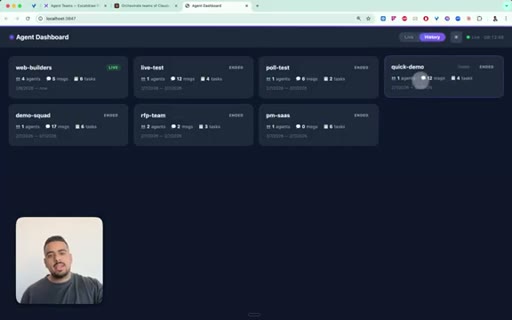
00:52HOOKHere, we can actually click, see the entire discourse, the description, and if there are conversations between them, kind of like sending an email to each other or messages to each other on Telegram, we'll be able to audit that with this infrastructure as well. And what's cool is you can click on the history tab and go through any of the prior sessions we had along with the associated messages.
01:12HOOKYou can audit what happened and why. So with that little teaser out of the way, I'm gonna walk you through how the agent team infrastructure works so you can leave this video understanding where to use it, when to use it, and more importantly,
01:25HOOKhow to actually surveil your agents. And the reason why is this agent's feature is amazing, but it swallows up tokens like a vacuum in a very short amount of time.
01:34HOOKAnd last thing is you wanna make sure that you're not using this feature frivolously, not using it just because it looks cool, but because you actually have a complex task where you need a series of agents with ideally a sequence in order to execute on a recurring basis. And to enable the agents team specifically,
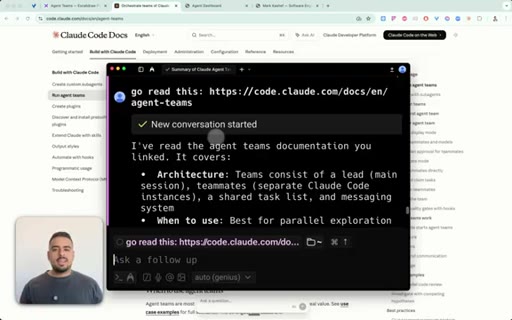
01:52what you have to do is enable the feature flag. Now if you are nontechnical, I have a cheat code for you. So instead of going to navigate this Claude settings dot JSON folder and worrying about what the heck you're doing, what you could do is literally go to the docs page on orchestrating these Claude code sessions
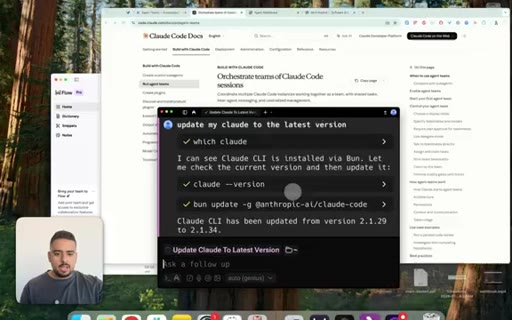
02:10and click on copy page. And then my cheat code is literally to give this to Claude code or to something like Warp, which is like a smart terminal to go and set everything that I need so I can just open Cloud Code and it's there. So as an example, I can go to Warp, then I could say,
02:26go read and double check that we have this installed correctly.
02:32I'll literally just throw that all in there. This will go through and just double check that our settings are where they need to be so you don't have to worry about putting this feature flag,
02:43all the agent team stuff, and you can even ask something like Cloud Code or Warp to help you with a proper prompt because the invocation of these teams is typically in this form where you say, I'm designing x, and I wanna be able to create an agent team or spawn an agent team. If you say something semantically similar to that, then that should suffice.
03:03If you wanted to make it even easier, then you could just give the URL right here and just say, read this document. It will come back with an understanding of the architecture, the feature flag,
03:13everything that you'll need, and you can just say, listen. Go and implement this all in my system. And once you're good and good to go from there, you can just restart Cloud Code.
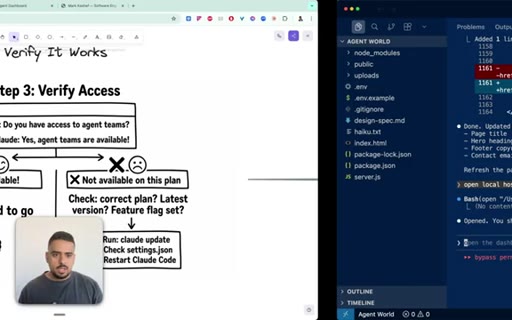
03:21It should work in a brand new session. And then ideally, you should interview it to access and ask it. Do you have access to agent teams?
03:29Once it says yes, then it'll explain what tools it has. If it doesn't say that and it assumes that teams means sub agents, that means it's not properly installed.
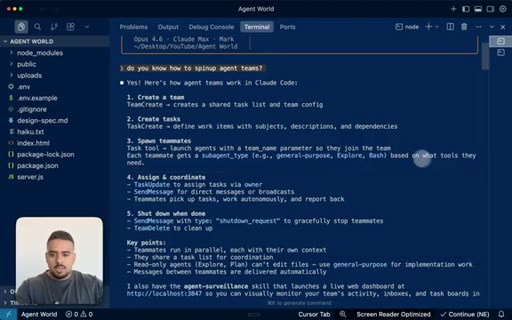
03:39So as a quick preview, if I go to my prior session, if I just said, do you know how to spin up an agent team right here? Then it replies saying, yes. I know how to create a team, and it should lecture you on all the tools it has.
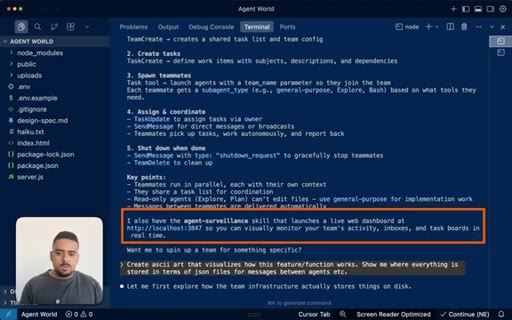
03:52So the name of the tools include these agent types, the task updates, the team delete. So once it's ready to clean up, the way teams work is once they spin them up, they persist until the actual goal is completed or the task is done, unlike sub agents where they spin up and die, spin up and die.
04:12And at the bottom here, I have a reference to the agent surveillance skill that I show you at the beginning of the video, and I'll even walk you through the TLDR of how you can approach building such a system yourself. And for step four, the goal is to assign the best model to the right agent at the right time. So in this case, the team lead always usually deserves Opus 4.6
04:32just because it will be managing the other sub agents as well. So the other team members will report up to the team lead to get approval, to get direction, so that's why you wanna be able to equip it with the highest complexity possible. For the additional team members, that's where it might make sense to use something like Sonnet 4.5
04:49or even Haiku depending on the task. And similar to invoking a spell, you have to say the magic words like we saw before to say something like create an agent team to review p r one four two. This could be an example of you actually reviewing an existing code base and looking for a team of reviewers.
05:06And these reviewers will be able to look at security, at performance, and validating test coverage in a way that it can finally discuss with each other. And similar to invoking a magic spell, you have to say those magic words like we saw before and say, create an agent team to review p r one four two.
05:23In this case, you could spawn up three different reviewers, one for security, one for code quality and performance, and one for actually validating the test coverage of the other two agents. So with all this out of the way, how do the teams work in-depth? So step one is you have the team lead looking around and understanding when it makes sense to spawn a brand new teammate.
05:43Even if the generation is in flight, meaning you've already assigned and hired three agents on top of your team lead, it could still decide that for this particular task or permutation, it might need to employ a new agent. Now the main thing to keep in mind is that as you spin up more and more agents, naturally, you will take more and more tokens.
06:03So if you're using something like Opus 4.6 for all of them, you will see your usage evaporate really quickly.
06:10The theoretical mental model of spinning up different agents is having them work on completely different areas of the build where it makes sense for them to communicate. So if you're using sub agents, then what would usually happen is if you created a front end sub agent and then a back end sub agent, they would both work on their separate tasks, but there would be no communication between them.
06:31So you could run the back end after the front end, but ideally, there's a contract between the front end and the back end. So to create that contract in a way that there's cohesion from day one, ideally, they should be able to work on their own context window, comma, but be able to message each other and ask each other on direction.
06:50Because if the front end is gonna implement a brand new framework or use a library, you wanna make sure that it's compatible with your back end. And this is where this feature becomes ingenious, where you have that cross communication and cross pollination
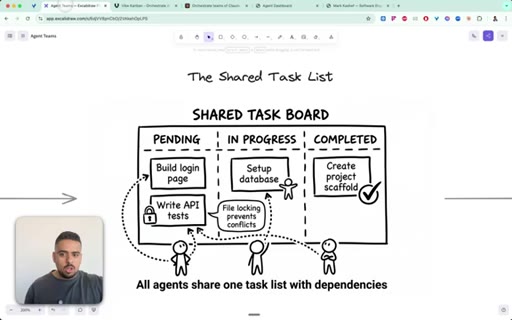
07:02of these agents in a way that you have full transparency as to what's happening. And in a way, this shared task list replaces a lot of the trend that I've been seeing over the past few months.
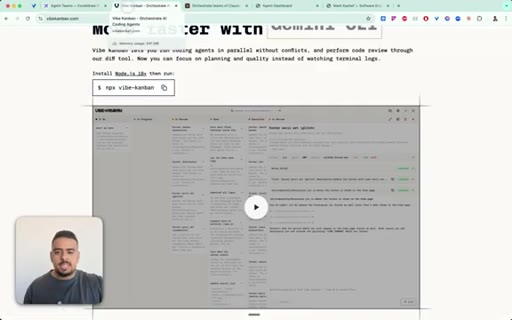
07:12We have things like Vibe Kanban, an open source framework where people can put different tasks, and it auto arranges those tasks. I found it to be buggy, sometimes slow, sometimes doesn't activate at all, and technically, this is built in.
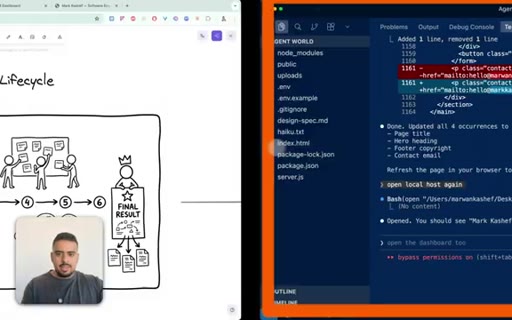
07:26So if we take a look at the agent dashboard that I showed you, I didn't actually engineer anything new here. It created all these categories right here inspired by the categories that are in the JSON files themselves. So I'm purely just visualizing what's happening and streaming the events in real time.
07:43The TLDR of the messaging system is you have the team lead who's always in the know, and then when the front end agent, agent a or agent b, are finished, they communicate with each other. So agent a will say, okay. I'm done the front end.
07:56And then the agent b will say, okay. I'm updating my endpoints. And then the front end, because they're closest to the fire, will update the team lead that it's all done.
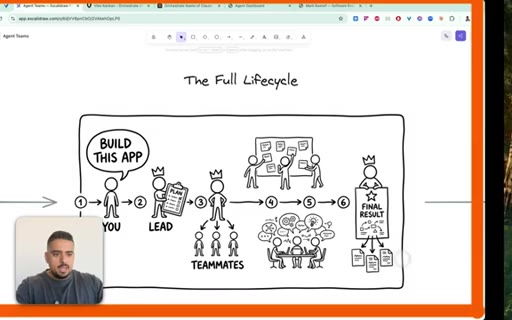
08:04So the full life cycle becomes you say, build this app and spawn a team to help me accomplish it. The lead then spawns. Typically, it creates three to five subemployees depending on the task.
08:15These become the teammates that all have their defined roles, and then they coordinate together to create a plan. Once the plan is approved or you've kind of put it into YOLO mode or bypass permissions mode to execute it, then you essentially get to the final result. And if we take a peek here at running that web page that I showed you earlier,
08:35Once it finishes, you could see all the tokens that it's taken. So I think it's around 80,000 tokens for this web page right here. Personalized web page.
08:44I didn't give it anything. Looks pretty clean in terms of layout and format, and it does work from what I could see. And it's essentially one shot it, so pretty impressive.
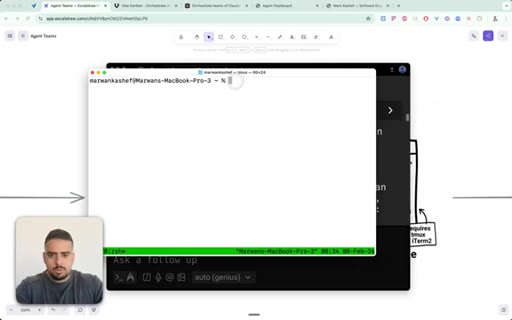
08:54In terms of watching the agents do the work, you obviously have options. Now some people like to use this framework that's called TMux, and TMux allows you to essentially have a terminal with a main window, and then you could see the sub terminals open up where you can audit and see what's happening with the agents. The reason I made this UI is, one, to make it universal, and number two, as a dev, when I was walking through and looking at it, I just noticed that things are moving so quickly that I'd have to constantly scroll through the history to properly monitor what's happening.
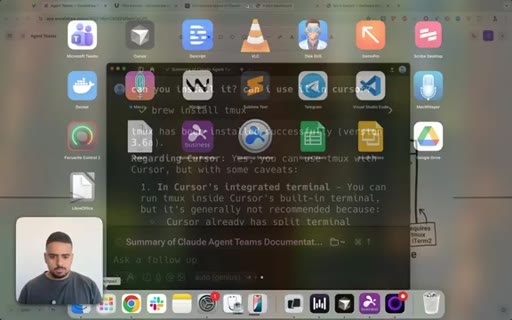
09:25So completely up to you. If you wanna actually install it yourself, then you can use something like Warp. And the way I would actually just install it is by asking it to install and update to my latest version.
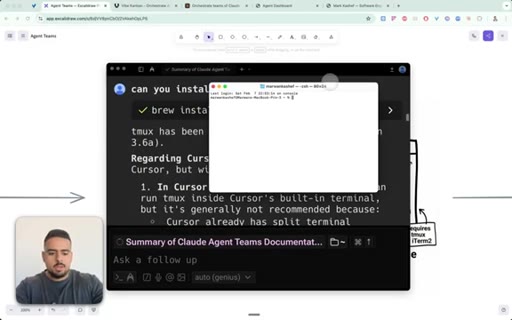
09:37I ask it, what is TMux? And it walks through exactly what that is. And then at the very bottom, once you wanna install it, you could say, can you install it?
09:46Can I use it in something like cursor? Then it walks me through that it's probably not the best use case there just because of the pain management. So you can just spin it up on your own terminal itself, and you'll notice if it works if we do something like this.
09:58So if we go to terminal right here
10:03and I spin this up and let's zoom in just a tad and then we say tmux, you'll see right here at the very bottom, it has this green little footer.
10:16Then if we say this is my shortcut for YOLO mode. You'll be able to spin up the agent teams, and it'll spin up multiple panes. But for me, it was a pain to look at that, a bit of an eyesore.
10:28So that's why we gave birth to this bad boy. And this is structured in a way where it's a skill. So it's invoked just in time.
10:35It's basically memorize the structure of the dashboard and memorize where it has to reference all the different files. Now what's the difference between agent teams and sub agents? Because that's a very important thing.
10:46So in the worlds of sub agents, they report back to you, but they never talk to each other. So even though they can run-in parallel, because of that lack of communication,
10:57you'll see a lot of disfluency or different objectives or different goals for the sub agents not knowing what their other agent compatriots are up to.
11:06One interesting thing is that with OPUS 4.6, it's infinitely better now at spinning up sub agents on the fly without you even asking for it to do things like explore your code base to actively, proactively
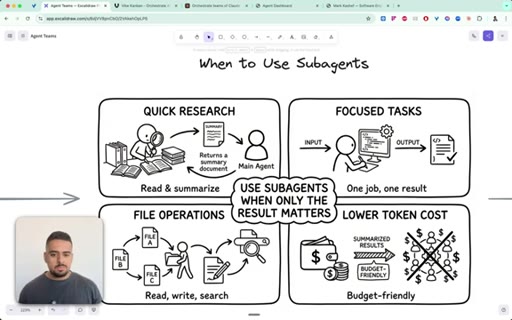
11:19preserve your context window as much as possible. So there's still a huge place for sub agents in the mix here. It's just a matter of when to use them.
11:27And for now, what I can see, when it comes to prepping, exploring, researching,
11:32doing tasks that are very admin in nature, it seems like sub agents is the way to go. Even though they also take a decent number of tokens, if it comes to code exploration, it will preserve your core context window, which really matters if you wanna be able to execute a team, execute sub agents, and still get everything done without having to compact your conversation.
11:52So if you needed one more diagram to drive this point home, with sub agents, you are the monkey in the middle right here getting all the discourse, all the updates, and you're the one who has to manage what has to happen next. In the world of agent teams, the team lead is the monkey, maybe not in the middle, monkey at the top, and then they receive all the inputs and questions
12:14and need for guidance from all the other teammates. Now when does it make sense to spend the tokens to use agent teams? Now these are four use cases that I've tried personally.
12:25I'm gonna keep experimenting and sharing what I find, but for now, parallel code review. If you've already vibe coded something and you're at the 85% mark and you're stuck, there's something not working.
12:36I personally have a project where I'm creating a version of OpusClip. It's a clone of it. I've been working on it for two months.
12:43I've been stuck on a core set of features that no matter how much I try or intervene using my own dev background, I can't get it over the line consistently. So I had it review the code base, and it found three or four areas where it had a series of duplicate functions or functions stepping on each other's toes that really muddied my code base.
13:03So having not just one extra set of eyes on it, but three or four helps you really orient yourself and better understand where to go next. The next, like I showed you, are cross layer features. So if you wanna build a web application or something on Next.
13:18Js and you have a front end, you have a back end, you have a database, and you have a series of features, this is where it makes a lot of sense to try to one shot the 80% with the team, maybe drive it home yourself. And the last two are debugging any hypotheses.
13:33So if you've watched my prior video before this even existed, I tried to create my own agent team by having multiple sub agents share a markdown file that they would use as a diary. So now that we live in this world, we don't technically need that strategy anymore unless you wanna preserve tokens at all cost. We can still use that method to do nontechnical
13:53tasks, create an entire brainstorming network. You could create a RFP generation network, proposal network. You can do all kinds of nontechnical things using this feature.
14:04And when it comes to research, a lot of people default to using things like Google deep research or Perplexity. Behind the scenes, you could implement a research committee. We have different agents go and research different parts
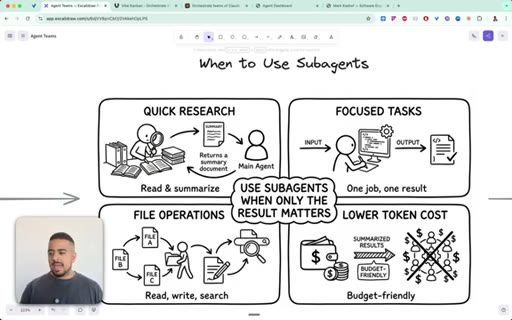
14:17but communicate their findings in real time. So you can imagine things like scientific discovery will become increasingly more possible. And when it comes to sub agents, it's really useful for quick research.
14:29We can just run it in parallel, a quick code exploration to see where things are or where certain files are, file operations where you wanna use lower token costs. So maybe you spin up four or five sub agents that use Haiku to do a very basic task.
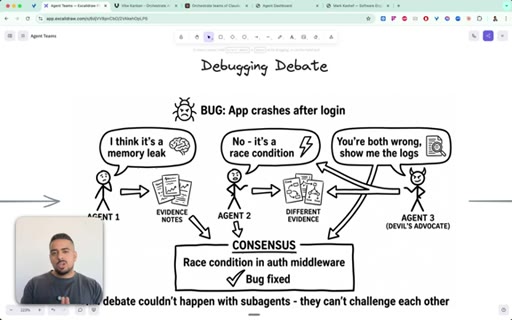
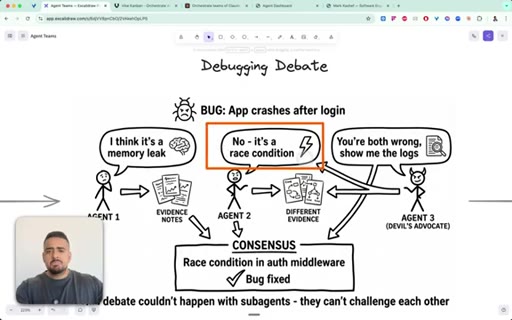
14:44But you know at the end of the day that those are just being executed. They're being checked off a to do list, but there's no value add of adding more agents to the network in terms of additive knowledge. So here's a tactical applied scenario of, let's say, debugging a code base.
14:59So you could have agent one in a agent team decide that there's a memory leak of some sort. And then agent two could say, no. It's a race condition.
15:08And if you have no idea what those words mean, don't worry about it. Maybe just exploring some concepts. And the agent three could act as the devil's advocate, where it could say, you know what?
15:17You're wrong and you're wrong. I actually think it's something completely different. And then they work together.
15:23They have their own consensus until they get to the final result. So it's literally like having a possible committee go through and vote on what the problem is to get to the bottom of it. Now this debate could also happen with sub agents, but like we said before, they couldn't directly fight each other.
15:40When it comes to spinning up an agent team related to building a feature like authentication, you could end up with a UI agent, an API agent, and a database agent. And the way it would work is the first UI agent would design
15:54the scaffolding for the page, and they would realize that it needs an API, an API to actually allow the login. So this goes to the API agent that creates the API and sends some form of response to double check that it works, and then it realizes it needs users table with an email and a hash. So it needs some support to bring this API to life so that when you actually log in, this actually does something.
16:18So then the database agent gets to work. It creates this new users table right here, and it says it's ready. So then it goes back to the API agent, then it can go back and say, listen.
16:29We're good to go. It's time to actually test this out. If you want a quick heuristic on when to use sub agents versus agent teams, if you have a brand new task,
16:38the easiest question you could ask yourself is do you need agents to speak to each other? If the answer is no, then you can use sub agents. Otherwise, you wanna ask the next question.
16:47Is the task complex enough to justify the overhead of token slash cost of tokens? If the answer is yes, then use agent teams.
16:56But there is a world here where you say no to all of them, and you just have a normal session with no agents at all. The mentality I want you to adopt is if you are a bootstrapped founder of a startup and you have a very fine amount of money. Now depending on what plan you're on, that could be a very good analogy.
17:14But if you are bootstrapped, you have to be very picky about when it makes sense to actually hire your first employee or employees unless you raise some funding. But unless you have raised funding for your Anthropic subscription, I doubt that's the case.
17:27So you just wanna be as selective and picky and responsible as possible. The pros, just starting off with that, is you can require plan approval for any risky changes. So you could still tell Claude that this is what you want in terms of a framework.
17:41You can ideally aim to have five to six different agents. Beyond that, from what I found, is diminishing returns. Same thing with sub agents.
17:50And then you could start all of them working on a research task before they all work on an actual execution task. And in terms of the gotchas, like I said, the token cost is very real, and it will add up very quickly. You could spend anywhere between a 100 to 300,000 tokens
18:06just spinning up and executing an agent team. The next thing is even if you have separated roles, I've found that agents can overwrite the same file. Now it might make sense for them to overwrite it, but once in a while, you'll notice that one will do a great job and the other will come in and change just a few things that make it either unusable
18:25or it added bloat unnecessarily. The last thing is unless you create a way to respin up the exact same agents with the same instructions, every time it shuts down, you won't be able to bring that back up.
18:37And last but not least, the lead of the team could end up coding instead of delegating. So, ideally, you want your head team lead to be looking at the big picture and looking at what everyone's doing and making sure it accomplishes the goal. But once in a while, you could see it coding itself.
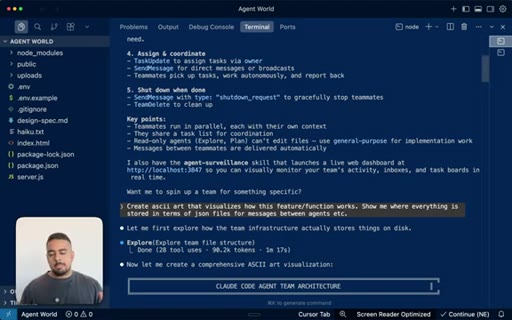
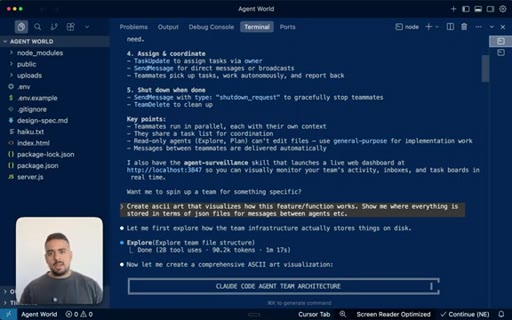
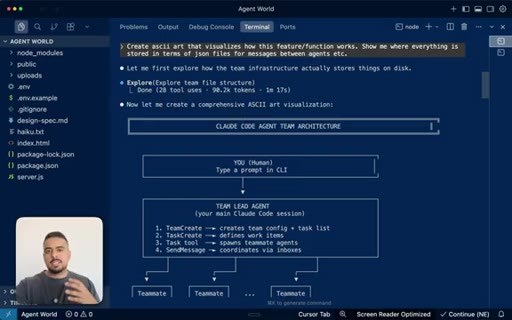
18:53So now you could see it stepping on the toes of its subemployees. Now hopping back into the terminal, one thing you can do to really visualize this entire system of where the messages lie, where the inboxes exist, is ask it for an ASCII art to visualize how this feature and function works. Now when I say this feature, I already referenced above the agents team feature.
19:13So it walks you. It says this you are the human, and you have a team lead. These are the functions that come with a team lead.
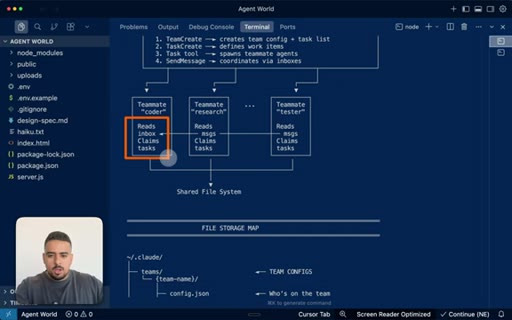
19:19So you have team create, task create, task tool, send message, then it walks you through how they share a file system. And then teammate coder will read the inbox, claim tasks. Teammate research will read the inbox as well, and so will the tester.
19:35And then in terms of file storage, it breaks down exactly where all this exists, which is why I always get confused while other creators confuse you with different folders and JSON files in a black terminal because it can be intimidating if you're nontechnical. You can just ask it to visualize it. And you can see right here, we have a config JSON that tells you who's on the team.
19:55Then you have all the agent mailboxes, which is one of the many ways we created that visual to monitor everything. All I said was, hey.
20:03Can you help me create a skill that when I say the words surveil my agents, we'll spin up the agent team and then look at the inboxes, look at the JSON files, and just stream whatever's there onto a local host UI. And ideally, make it so that you can spin up the same local host every single time so you don't have to go and search for a port.
20:24And then when you get to tasks, all of these are also structured. So the shared tasks board where something's pending, completed, that basically, that Kanban essence is already native to this structure.
20:35So with all of that in mind, you can see right here, this is my skill, my dashboard database using what's called SQLite,
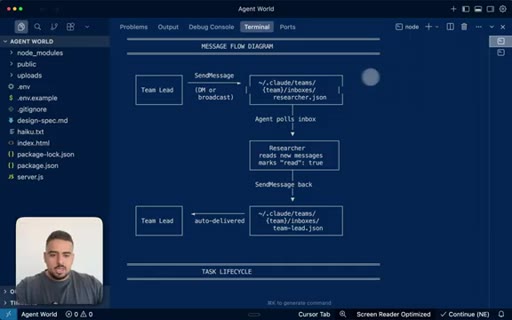
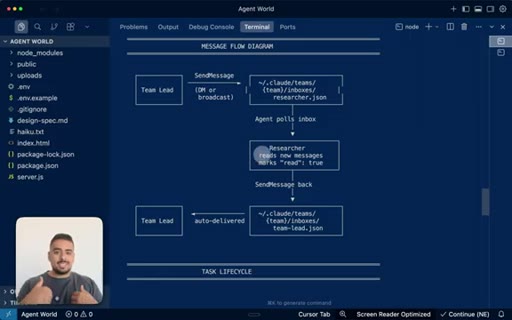
20:42a free database that can live on your computer. No need for super base or anything else. In terms of where the information flows, this shows you exactly that the team lead will send a message directly to the inbox of the researcher.
20:55So it's at dot claud slash teams slash dynamic name of your team, inboxes, researcher dot JSON, then the agent waits to see when the next message arrives. Once it reads it, it tells us that it's read it.
21:09So if you think of WhatsApp or Telegram, when you see those two check marks and they're blue, then it knows you've read it. In this case, you have the exact same system. And then you have the task life cycle where you create a task, update said task, and then you delete the task when it's completed.
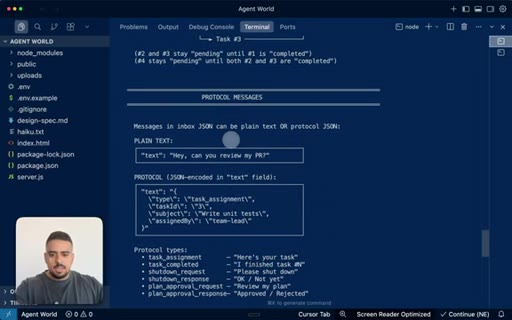
21:25And then the protocol messages look like this. So, hey. Can you review my PR?
21:29Like an actual human. Then you have the overall protocol, the protocol types, and this breaks down my surveillance dashboard.
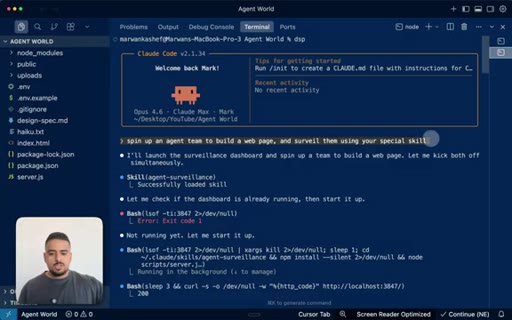
21:37So it always will spin up on local host 3847. You can see live and history tabs, and you have a Kanban board and the inbox threats. If you watch it in action, it's literally as simple as me saying spin up an agent team to build a web page and surveil them using your special skill.
21:53Again, I told it in the skill itself that it should surveil the team whenever I say those words. So it knows to load that skill right here, then organizes itself, comes up with the three agents and the sub builders. It walks through how the pipeline will be designed.
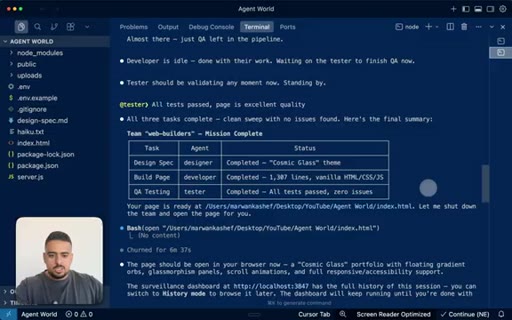
22:09CTAIt executes the tasks. And while this is all happening, it's streaming on the main web page that I showed you.
22:17CTASo once this is all done, then we're good to go. And the best part is it auto shuts down the session. And when it auto shuts down the session, that's where you can see everything go in the history tab.
22:27CTASo you can see right here, this is the ended session of the web build right here, and we can always go back and look at the messages, tasks, etcetera. And that's pretty much it. So, hopefully, now you have a better understanding of when to use sub agents, how they work, and where it makes the most sense versus using something like sub agents or nothing at all.
22:45CTAIf you want access to all the diagrams I showed you along with a prompt that you can use to start your journey of creating your own skill for your own agent dashboard, I'll make them both available to you in the second link in the description below. But if you want access to my skill that I spent a couple hours putting together to make sure it works at least nine out of 10 times, then you're gonna wanna check that out in my exclusive early AI adopters community.
23:07CTAAnd last but not least, if you found this video helpful and educational, would be super helpful for you to leave a comment and a like on the video. It really helps the video, really helps the channel, and I'll see you all next
— full transcript
§ 05 · For Joe

Steal the surveillance skill.

JoeFlow / agent orchestration playbook

The real unlock here is not the agent teams feature itself — it is the idea of building a Claude Code skill that makes your agent fleet legible in real time.

  • The decision flowchart (talk to each other? complex enough?) is a ready-made prompt template — steal it verbatim.
  • Model allocation rule is concrete and actionable: Opus for the lead, Sonnet for every teammate. Use this in any agent prompt you write.
  • The surveillance skill pattern (keyword phrase -> localhost dashboard always on the same port) is directly applicable to JoeFlow Sessions panel.
  • The gotchas section (overwrite conflicts, no session resume, lead coding instead of delegating) is a standalone short-form video waiting to happen.
  • Mark's two-tier CTA (free diagrams + prompt in description, paid skill behind community paywall) is a clean offer architecture worth borrowing.
§ 05 · For You

When to actually use agent teams.

The practical decision rule

Agent teams cost real money (100K-300K tokens per run) — use them only when agents genuinely need to negotiate with each other.

  • Ask one question before spinning up a team: do the agents need to talk to each other? If no, sub-agents are cheaper and simpler.
  • The right use cases are: parallel code review on a stuck project, building features that span frontend + backend + database, and debugging where you want competing hypotheses.
  • Start every new project with sub-agents. Upgrade to teams only when you hit communication walls.
  • Use Opus 4.6 for the team lead, Sonnet 4.5 for workers — this alone can cut token cost significantly.
  • Budget 5-6 tasks per teammate maximum; beyond that, returns diminish fast.
§ 06 · Frame Gallery

Visual moments.